Five Planes and a Trust Fabric: A reference architecture for production multi-agent systems. The six tensions, the planes that hold them, and the lessons paid for in expensive ways.

It is a Tuesday morning at a Fortune 500 procurement organization. A category leader opens a spreadsheet of contracts expiring in the next ninety days. Six hundred and forty rows. Industry research puts twenty to thirty percent of enterprise SaaS and services spend at risk of waste through overlap, unused seats, and unrenegotiated terms. For a company this size that is somewhere between forty and sixty million dollars a year, leaking quietly out of the back of the budget. The category leader has the same headcount she had two years ago. She will work through the top fifty rows carefully and approve the rest at last year’s terms. The leak continues.

This is not a headcount problem. It is a system problem. The architecture I share below is one approach to solving it, and a few hundred problems shaped like it.

I have spent the last year and a half building agentic software in regulated environments, mostly insurance. The lesson I would write down for any CTO is this: the model is not the product. The architecture is the product.

Frontier models are converging in capability. They are sold by the token, hosted by everyone, and they will only get better and cheaper. The competitive moat is no longer “we picked the right model.” The moat is what you built underneath. The agentic systems that win the next decade will look less like clever prompts and more like distributed systems with probabilistic components. They will be designed, instrumented, and governed accordingly.

What follows is the reference architecture I wish I had been handed when we started. It has five planes, one cross-cutting Trust Fabric, and six architectural tensions that define every meaningful design decision. It is opinionated. It is also field-tested. I use it to evaluate every new feature, every vendor pitch, and every architectural decision my team makes. If you are a CTO, VP of Engineering, or principal architect trying to move from copilots to autonomous workflows without setting fire to your security team’s hair, this is the map.

The thesis

A multi-agent system is not an LLM with extra steps. It is a distributed system in which several components reason in natural language, fail unpredictably, and accumulate state across interactions. That sentence sounds banal. It is the most consequential idea in this entire essay.

Most agent pilots stall short of production for the same reason most early microservice migrations stalled. People build the happy path and discover, only in production, that the architecture has no answer for identity, observability, cost, failure isolation, or upgrade paths. Gartner projects forty percent of enterprise applications will embed task-specific agents by the end of 2026. Industry analysis of pilots puts the share that reach production at roughly fifteen percent. The gap between those two numbers is not a model problem. It is an architecture problem.

The six tensions

An architect’s job is to hold trade-offs in productive opposition. Most “AI strategy” decks read like wish lists (scalable, secure, cheap, flexible, extensible) as if all five properties could be maximized at once. They cannot. The interesting design choices live in the trade-offs, and six tensions define the space:

Autonomy and Oversight. How much an agent decides alone, and where a human reclaims the steering wheel. Too much autonomy and you lose accountability and regulatory cover. Too much oversight and the system delivers nothing the human could not have done themselves.

Quality and Cost. Frontier reasoning is excellent and expensive. Small specialized models are cheap and adequate for most steps. Routing the wrong task to the wrong tier produces systems that are either too expensive to scale or too unreliable to trust.

Velocity and Safety. Ship fast and gate hard are in permanent opposition. The eval flywheel, shadow deployments, and graduated rollout are how you live with both. Skipping any of them is how you ship features that look like outages.

Specialization and Composability. Narrow agents are reliable but compose-heavy. General agents are flexible but unreliable. This is the same trade-space that gave us microservices versus monoliths, and it has the same right answer for most enterprises.

Adaptability and Stability. The model layer churns every quarter. Production systems need durable contracts. The architecture has to absorb the churn invisibly to the application code.

Action and Reversibility. Every side effect is a potential cleanup bill. Idempotency keys, dry-run modes, and compensating workflows are not nice-to-haves. They are the design pattern that lets an agent act on a system the business depends on.

A reference architecture is the discipline of holding all six tensions in productive opposition and refusing to surrender any of them. Every plane in the stack below is doing real work against at least one tension, sometimes two or three.

The architecture in one picture

Five horizontal planes, stacked from foundation to experience. One vertical Trust Fabric that cuts across all of them. Every plane has its own primitives, its own failure modes, and its own evolution path. The Trust Fabric is what turns a stack of probabilistic components into something an enterprise can put its name on.

Read the picture this way. A request arrives at the top, from a human or another system. The Orchestration plane decides which agents will run and how they will coordinate. Each agent reasons and acts using the Tool and Action plane to touch the outside world. It reads from and writes to the Memory and Knowledge plane to maintain context across time. Underneath it all, the Model plane provides the reasoning fabric, routed and cached and budgeted. The Trust Fabric watches every step, enforces policy, accounts for cost, and decides when to call a human.

To make this concrete, let me run one request end to end.

One request, end to end: the Monday queue

It is Sunday at 7:14 AM. A contract renewal triggers automatically ninety days before its expiration. The work that used to take a procurement analyst the better part of a week, spread across vendor portals, SOC 2 repositories, usage analytics, and three internal systems, will be staged for review before the team gets to their desks Monday morning.

A Renewal Supervisor agent wakes up in the Orchestration plane. It pulls the contract from the source-to-pay system, reads its declared policy in the Trust Fabric (“read-only across these systems, write-allowed against the draft repository, commercial term changes above ten percent require human approval”), and decomposes the work into four parallel tracks.

A Risk Reassessment agent queries the Memory and Knowledge plane for the vendor’s history (three years of SOC 2 reports, security incident records, financial filings) and pulls fresh external signals (regulatory actions, public breach disclosures, financial press) from a curated retrieval index. The model behind it is a mid-tier model routed through the AI gateway, because the work is retrieval-shaped rather than reasoning-shaped.

A Market Benchmark agent uses the Tool and Action plane to query the company’s contract repository for comparable agreements, queries internal pricing intelligence, and pulls public pricing where the vendor publishes it. Each query is authenticated with a short-lived token tied to the agent’s identity, not a shared service account. Every action is logged.

A Usage and Fit agent evaluates whether the vendor’s product still fits the company’s footprint. It uses semantic memory to apply the procurement organization’s vendor strategy and procedural memory to recall the company’s standard consolidation patterns. It flags two seat tiers that should be cut and one feature tier that should be downgraded.

A Communication and Routing agent assembles the renewal package: a risk reassessment summary, a benchmark-based negotiation position, a usage-based commercial recommendation, and a draft outreach to the vendor’s account team. It composes from the outputs of the other three agents, references the category leader’s preferred negotiation tone from episodic memory, and routes the package through the approval workflow. Legal sees the contract diff. Security sees the risk reassessment. Finance sees the commercial recommendation.

The Renewal Supervisor reconciles the four tracks, validates the proposed action against policy (“proposed commercial term change is eight percent, no executive approval required for the negotiation position; the security risk score moved one tier, route for security lead review”), writes a complete trace into observability, attributes the cost of the entire run to the contract record, and surfaces the work in the category leader’s queue.

When the team opens their laptops on Monday morning, six hundred and forty renewals are staged with full context, recommended actions, and a single click to approve each track. The work that was impossible at this scale has become routine. The architecture made it look easy.

Notice what just happened across the six tensions. The Renewal Supervisor concentrated autonomy where the cost of being wrong was low and routed to humans where the cost was high. The model tiering gave us quality where reasoning mattered and cost discipline everywhere else. The four parallel agents specialized while the Supervisor composed. The gateway absorbed the model layer. Every action was idempotent and reversible. Every step was visible. The system was fast and safe at the same time, because the architecture made the trade-offs explicit instead of implicit.

Now let me show you what is inside each plane.

The Model plane: portfolio, not pick

The first instinct of most engineering teams is to pick a model. That instinct is wrong. You are not picking a model. You are building a portfolio.

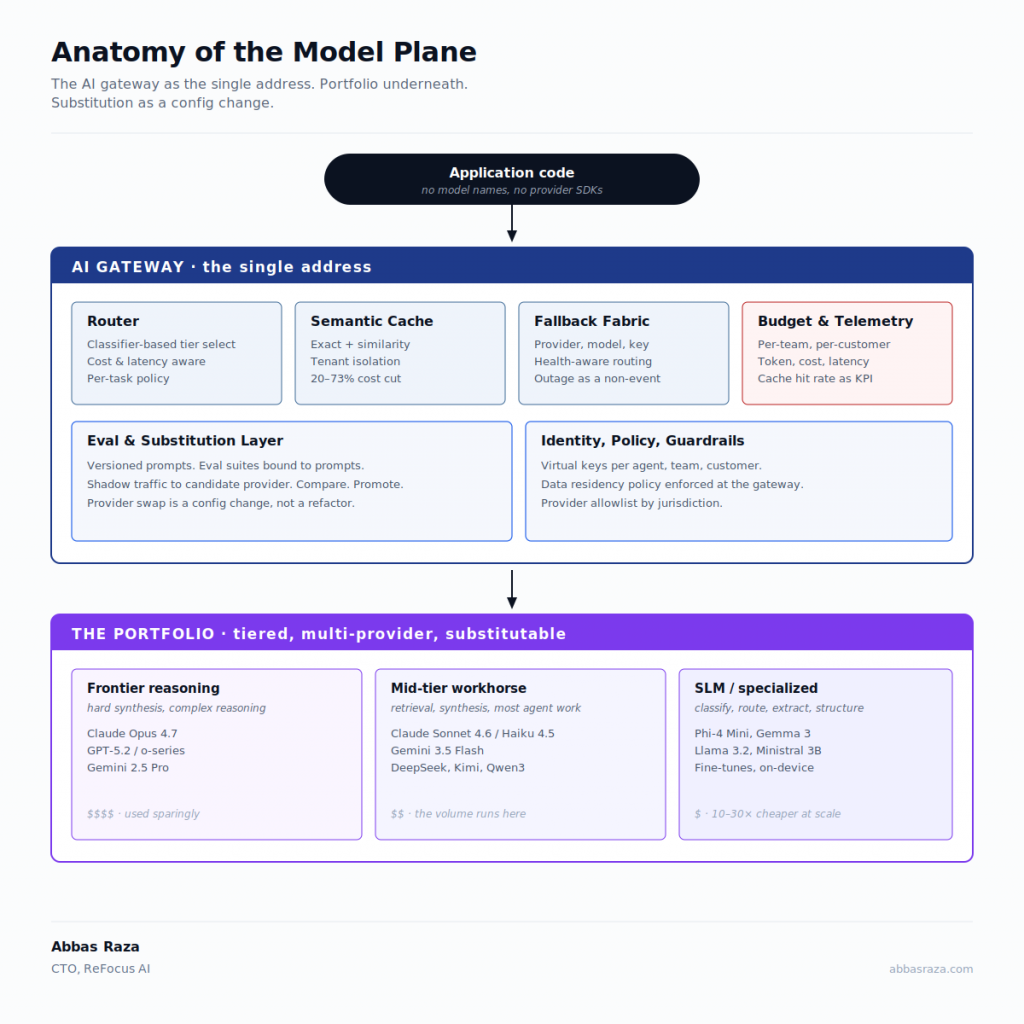
A serious Model plane has four properties. It is multi-provider by default, because any single provider is one outage or pricing change away from breaking your business. It is tiered, because the cost gap between a small specialized model and a frontier reasoning model is now two orders of magnitude on tasks where both perform comparably. It is routed, because the right model for classifying a customer message is not the right model for synthesizing a six-source analysis. And it is cached, because in real-world workloads more than thirty percent of requests are semantically similar, and you should not pay for the same answer twice.

The mechanical realization of all four properties is an AI gateway sitting between your application code and every model provider. Your code calls the gateway. The gateway routes, caches, falls back, enforces budgets, and emits telemetry. Production teams running this pattern report cost reductions in the forty to seventy percent range without measurable quality regression.

There is one design rule I would tattoo on every engineer’s wrist: no model names in application code, ever. If a model identifier appears as a string literal anywhere outside your gateway configuration, you are one provider change away from a refactor. Treat model names like database hostnames. They live in config.

The deeper play is to design for substitution. The gateway abstracts the wire format. Your evals run against any backing model. Your prompts are versioned. When the next frontier release lands, you swap a config flag, rerun the eval suite, and ship. The teams that get this right will spend an afternoon doing what their competitors spend a quarter doing.

This is where the Adaptability and Stability tension is fought and resolved. The application code above the gateway has zero awareness that the model layer is changing every six weeks. The gateway absorbs the churn.

A final word on small language models. The 2025 to 2026 progression in distilled and task-specific SLMs has been remarkable. For classification, extraction, routing, and structured generation, a well-tuned SLM running on cheap inference often beats a frontier model on the only three metrics that matter in production: latency, cost, and reliability. Use them. The agentic future is not all frontier. It is a portfolio.

The Memory and Knowledge plane: curate before you store

If the Model plane is the engine, the Memory and Knowledge plane is the long-term character of the system. It is also where most agentic deployments quietly fail.

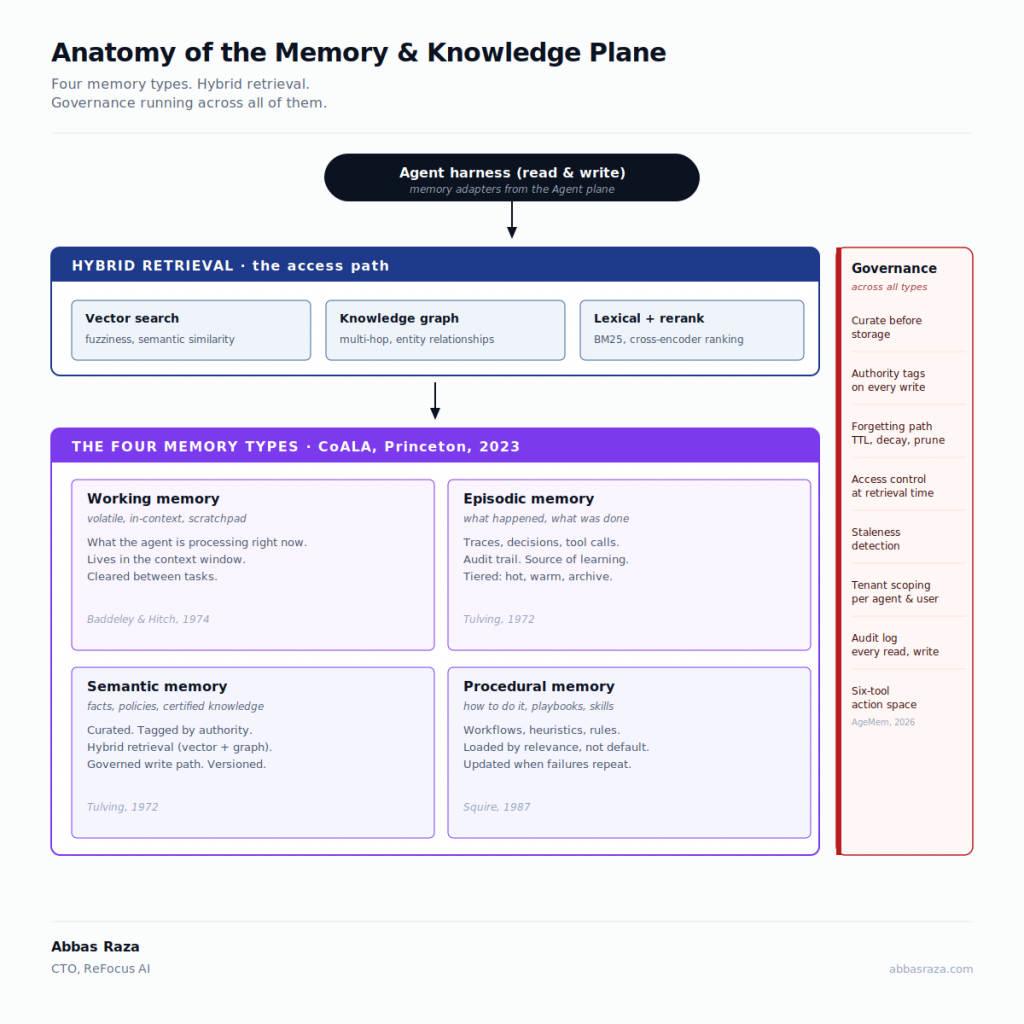
Production agents need four distinct memory types, designed deliberately:

  • Working memory holds the current task. It lives in the context window and the active scratchpad. It is volatile by design.
  • Episodic memory records what the agent has done and what happened. It is the audit trail. It is also the source of learning.
  • Semantic memory holds facts: the company’s procurement playbook, the vendors’ commercial appetite, the customer’s coverage profile.
  • Procedural memory holds how-to knowledge: the workflows, the heuristics, the playbooks.

The most common failure I see is treating all four as a single vector database. They are not. They differ in write authority, retention policy, retrieval pattern, and governance. A vector database is necessary, but it is not the architecture.

The principle I repeat to every new engineer is this: do not copy chaos. Connect to truth. When you ingest enterprise content into your memory plane, curate before storage. Tag content by authority level. Policy and Standard go in. Opinion and draft do not. Otherwise your agents will confidently cite documents that someone wrote in a Slack thread three quarters ago and forgot about.

The unresolved problem in this layer is staleness. A memory about a vendor’s pricing, a metric definition, or a customer’s employer is highly relevant until it is not, at which point it becomes confidently wrong. The right answer combines retrieval recency, source certification, and intentional forgetting. Build the forgetting path. Most teams forget to.

And bring back knowledge graphs. Vector search is necessary for unstructured retrieval. It is also embarrassingly bad at multi-hop reasoning about entities, relationships, and time. The teams I admire most are running hybrid retrieval: vector for fuzziness, graph for structure, with the agent orchestrating both.

The Specialization and Composability tension lives here too. The four memory types are deliberately specialized. The agent runtime is what composes across them. Treating all memory as one undifferentiated blob is the architectural equivalent of putting all of your data in one denormalized table and wondering why nothing scales.

The Tool and Action plane: the new API surface

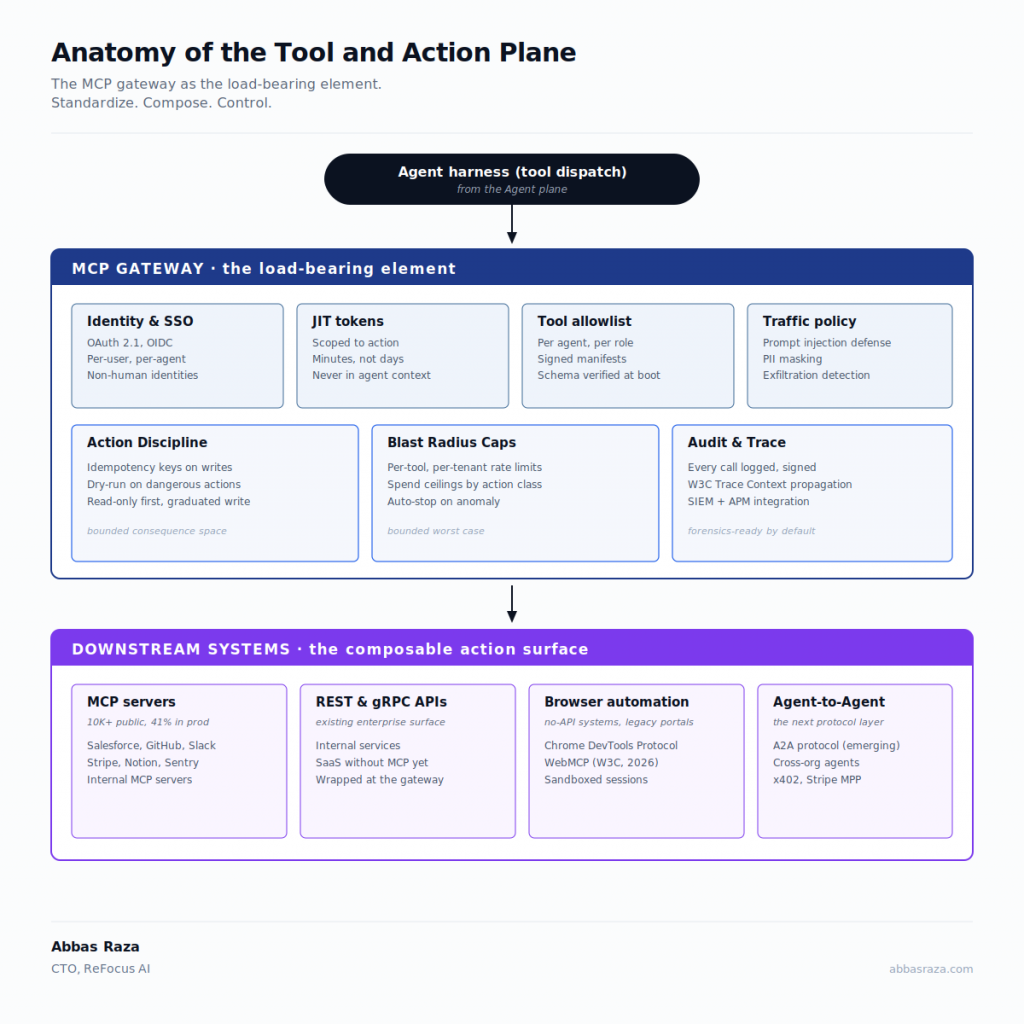
This is the plane where ambition meets risk. An agent that only reads is a research assistant. An agent that acts is a system. The Tool and Action plane is what makes the difference, and it is the surface where most security incidents will live.

The single most important development in this plane is the Model Context Protocol. MCP, originated by Anthropic in late 2024, donated to the Linux Foundation in late 2025, and adopted by every major model provider through 2025 and 2026, is doing for agent-to-tool integration what HTTP did for documents and what USB did for peripherals. Before MCP, every agent needed bespoke connectors for every tool. After MCP, the integration problem becomes N + M rather than N × M. If you are not designing your tool layer on MCP today, you are choosing future technical debt deliberately.

But MCP by itself is just a protocol. The production pattern is the MCP gateway, which sits between your agents and your tools the same way the AI gateway sits between your agents and your models. The MCP gateway authenticates agents, issues short-lived just-in-time tokens for tool access, inspects traffic for prompt injection attempts and data exfiltration patterns, enforces per-tool policies, and records every action for audit. It is the agent equivalent of an API gateway, and it is non-negotiable for any production deployment.

A few design rules that have earned their place in my notes:

Idempotency keys on every side-effectful action. Agents retry. So do their orchestrators. Without idempotency, you will double-bind a customer or send two emails.

Dry-run modes on every dangerous action. Before the agent files an actual binding request with a vendor, it should be able to run the same call in a simulated mode and surface the diff. This is the most important pattern almost no team builds.

Read-only first, then graduated write access. When a new agent enters production, give it read access for a quarter. Let it earn the right to write. The discipline pays for itself the first time the agent does something unexpected.

No long-lived credentials in agent context. This is the single biggest preventable security vulnerability in the agentic stack. Static API keys in agent memory mean a prompt injection becomes a data breach. Use JIT tokens, scoped to the action, expiring in minutes.

This is where the Action and Reversibility tension is decided. Every design choice in this plane should be evaluated against one question: what does it cost us to undo this action if it turns out to be wrong? If the answer is “more than we can afford,” redesign until the answer changes.

Browser-based action deserves a brief note because many of the systems agents need to act on, especially in regulated industries, do not have public APIs and never will. Browser automation is not a hack. It is a permanent component of the agent stack. Design it like one: sandboxed runtimes, fingerprint hygiene, session vaulting, and the same audit trail as any other action.

The Agent plane: harness engineering, or why the model is not the bottleneck

In every agentic deployment I have observed, the teams that succeed build narrow agents. The teams that struggle build one general agent that tries to do everything.

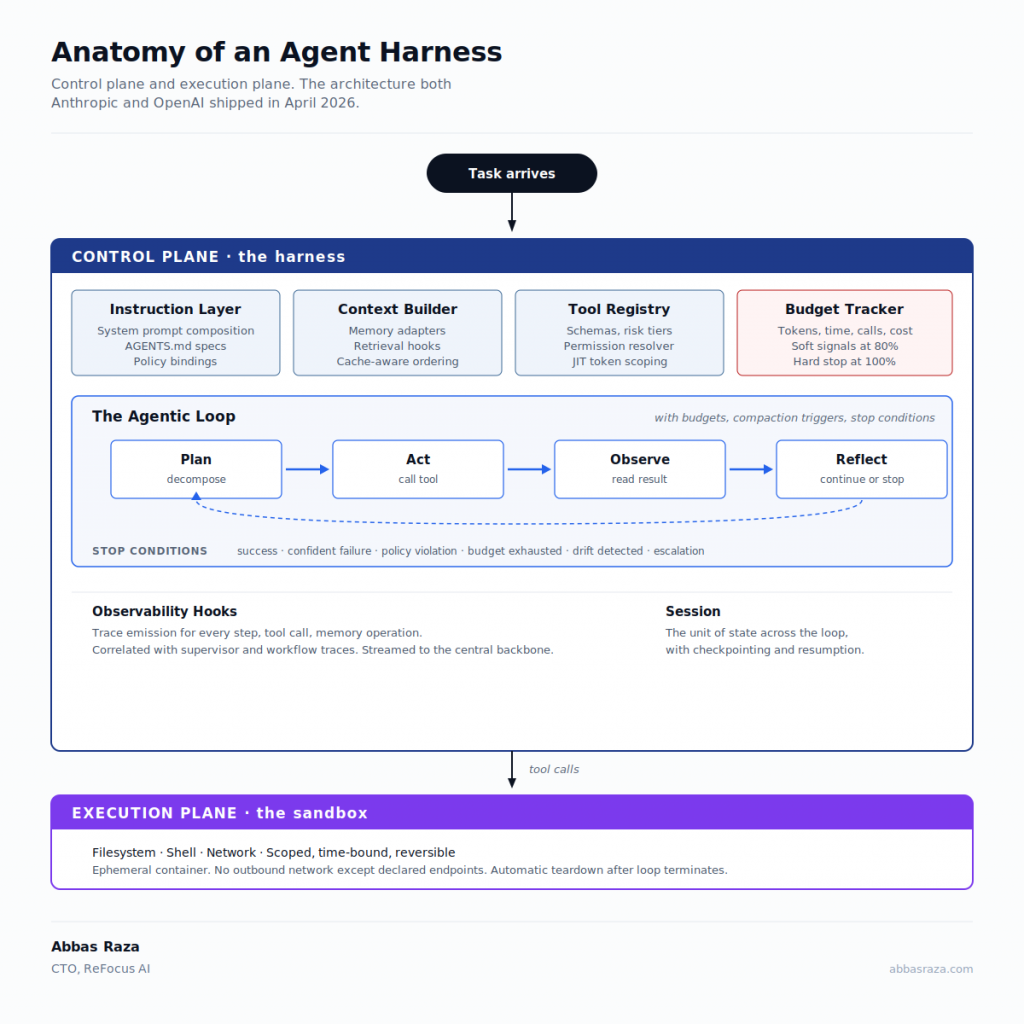
A production agent is not a clever prompt. It is a unit of software with an anatomy: a planner that decomposes goals, an executor that calls tools, a critic that checks outputs, memory adapters that read and write across the Memory plane, and an error handler that knows the difference between a recoverable failure and an escalation. It has an interface, a versioning scheme, a test suite, and an owner.

The field has converged, through early 2026, on a name for the discipline of building this scaffolding: harness engineering. The frame, popularized by Anthropic and amplified by OpenAI’s engineering blog and a wave of practitioner pieces through the first half of the year, is this: the model is the brain. The harness is the nervous system that lets the brain do useful work. The harness comprises the prompt construction logic, the memory orchestration, the tool dispatch layer, the execution loop, the sandbox, the error handler, the cache manager, and the audit hooks. It is the runtime equivalent of an operating system around a CPU.

The architectural equation worth committing to memory:

Reliable Agent = Foundation Model + Harness

Industry analysis of failed enterprise pilots converges on the same finding: roughly two-thirds of failures trace to harness-level defects (memory contamination, tool misconfiguration, brittle prompt scaffolding, missing error recovery) rather than to model capability. Roughly eighty percent of pilots fail to reach production at all. The decisive variable is the harness, not the model.

The practical implication for any CTO: the ratio of engineers working on prompts versus engineers working on harness is one of the most consequential staffing decisions you will make this year. The teams I admire most run that ratio at roughly one to four. The teams I watch struggle run it inverted.

The most underrated artifact in the Agent plane is the agent registry. Every agent in your environment is registered: who owns it, what it is allowed to do, what its declared blast radius is, what data it can touch, what models it can call, what its eval suite says about its current quality. The registry is the single source of truth that lets your security team sleep, your finance team forecast, and your engineering team upgrade with confidence. Build it on day one, even when there is only one agent. It is far easier to add agents to a registry than to retrofit a registry around agents.

The agent lifecycle should mirror software:

  1. Design, with explicit goals and out-of-scope statements.
  2. Eval, with a test suite that runs before any deployment.
  3. Shadow, in which the agent runs in parallel with the human and its outputs are compared but not used.
  4. Canary, in which the agent handles a small fraction of real traffic with tight monitoring.
  5. Production, with full traffic and ongoing online evals.
  6. Retirement, because agents, like services, deserve a deliberate end of life.

The deepest architectural choice in this plane is one I made early and never regretted: narrow over general. A “renew this contract” agent that does one thing well, with a known eval set and a bounded action surface, is worth more than a “do anything” agent that needs ten guardrails to keep from embarrassing you. This is the Specialization and Composability tension resolved in favor of specialization at the agent layer, with composability moved up to the Orchestration plane where it belongs. The same discipline that moved enterprise architecture from monoliths to microservices. Build small. Compose deliberately. Replace ruthlessly.

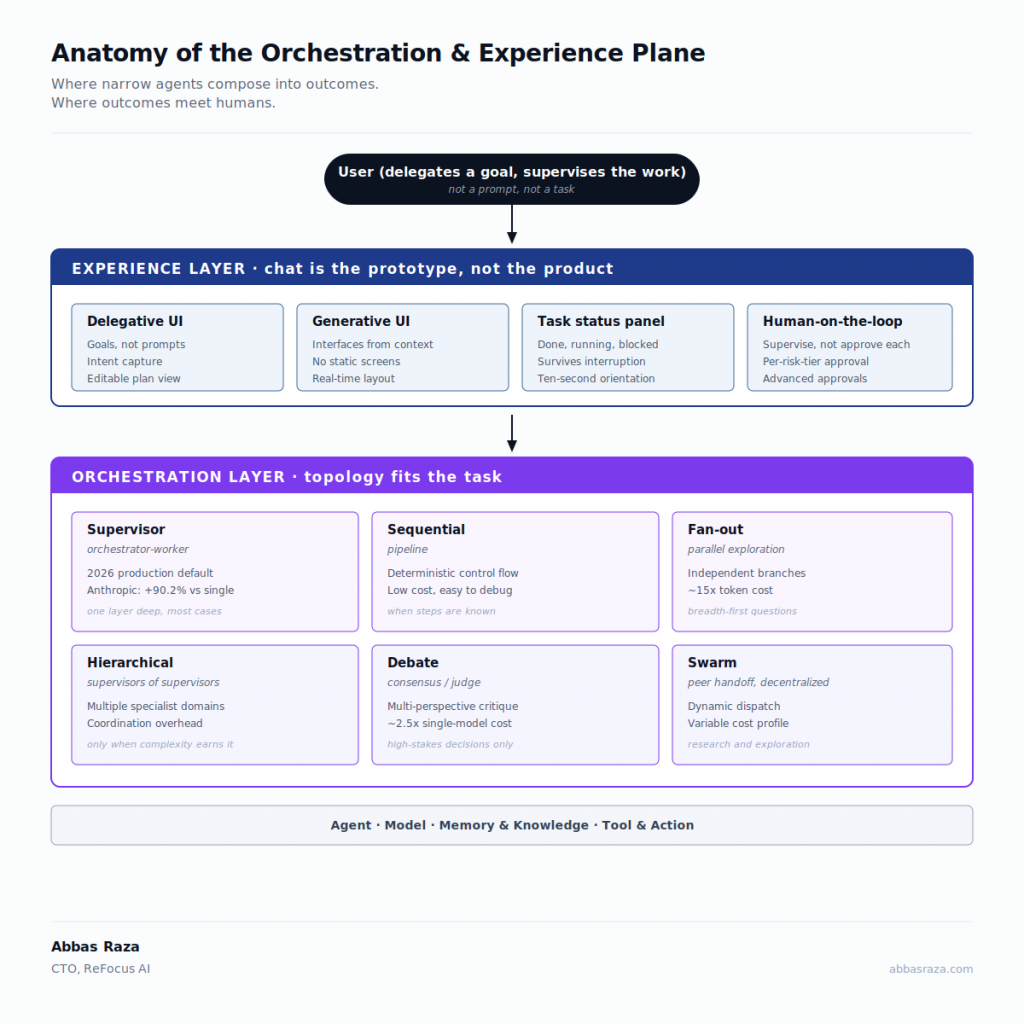
The Orchestration and Experience plane: topologies that earn their keep

When agents need to work together, you have three canonical topologies, and the question is not which one is best but which one fits the workload.

Hierarchical (supervisor-worker) is a tree. A supervisor agent decomposes a goal and delegates to specialized workers, then reviews and integrates. This is the workhorse pattern for most production deployments because it concentrates accountability, makes failure isolation tractable, and maps cleanly to existing approval hierarchies. The renewal example above is hierarchical.

Mesh (peer-to-peer) is a graph. Agents broadcast capability manifests and form task graphs dynamically without a single orchestrator. Mesh is powerful when the work is genuinely emergent and no single agent can plan the whole. It is also the topology that amplifies errors fastest, so use it with caution.

Pipeline is a line. Each agent’s output is the next agent’s input. Pipelines are excellent when the work is deterministic in shape and only the content varies. They are also brittle, because every stage’s failure cascades.

The pattern most mature deployments converge on is a hybrid: a hierarchical outer loop, with mesh collaboration inside specific phases where shared evidence accumulates on a blackboard (a shared workspace agents write findings to and read from). Supervisor-worker gives you the control plane. Blackboard gives you the data plane.

This plane is where the Autonomy and Oversight tension gets resolved at the workflow level. The topology you choose determines where humans intervene, how exceptions surface, and how accountability is distributed.

On experience, one strong opinion: chat is the prototype, not the product. The early agent demos were chat-shaped because that is what was easy to build. The mature surface is workflow-native. Agents live inside the systems where work already happens (the source-to-pay system, the email client, the CRM, the underwriting workbench), and they appear as a queue of completed work to be reviewed and approved, not as a conversation to be had. A renewal you have to discuss with an agent over chat is not a renewal that scales. A renewal that arrives in your queue with a recommendation, three alternatives, and a single click to approve is a renewal that scales.

The Trust Fabric: the layer that turns a pile of agents into a system

If I could go back and give myself one piece of advice, it would be to invest in the Trust Fabric six months earlier than felt comfortable. It is the difference between a prototype and a product.

The Trust Fabric is the cross-cutting set of controls that runs through every plane. Seven concerns live here, and each one is non-negotiable for any system meant to act on behalf of a regulated business:

Identity. Every agent is a non-human identity, registered, owned by a named human, authenticated through your enterprise identity provider. No shared service accounts. No anonymous agents. The non-human identity population in most enterprises already outnumbers humans by an order of magnitude, and agents will widen that gap. If you cannot enumerate every agent in your stack by name, owner, and capability today, that is the work to do this quarter.

Authorization. Capability-based, least-privilege, short-lived. Tokens scoped to a specific action, expiring in minutes, issued at the point of need. The Cisco and Microsoft zero-trust frameworks released through 2025 and 2026 codify this well, and your existing identity provider almost certainly has the primitives. Use them.

Guardrails. Prompt injection defense at the gateway. Semantic inspection of agent intent before action. Output validation, especially before any side-effectful call. Treat the agent’s input stream the way you treat user input: assume hostile, validate explicitly.

Observability. Every reasoning step, every tool call, every memory operation traced and stored. The agentic equivalent of distributed tracing is now a solved problem, and there is no excuse for shipping an agent you cannot debug. If something goes wrong in production, you need to replay exactly what the agent saw, decided, and did.

Evals. The eval flywheel is the single most important practice in this stack. Offline evals before deployment. Online evals continuously in production. Regression budgets that flag silent quality drift when an upstream model updates. Treat evals like tests, not like research projects. Make them a required gate. This is where the Velocity and Safety tension is finally resolved.

Human oversight. Graduated autonomy is the design pattern that lets agents move fast without breaking things. Low-risk decisions execute. Medium-risk decisions notify. High-risk decisions require approval. The 2026 direction of travel is away from human-in-the-loop (humans approve every decision, which does not scale) and toward human-on-the-loop (humans supervise the system and intervene on exceptions). Design for the latter.

FinOps. Spend visibility per agent, per workflow, per customer, per feature. Hard budgets enforced at the gateway. Cache hit rate as a first-class KPI. The cost spirals in agentic systems are almost never the fault of the model. They are the fault of a missing budget control.

Compliance. EU AI Act provisions came into force across 2026. ISO/IEC 42001 is the de facto AI management system standard. DORA, live for EU financial services since January 2025, is worth addressing precisely because it is widely cited and widely misunderstood in this context. DORA is not an AI regulation. It does not mention agents. It does not have to. Every AI agent is an ICT system, and DORA’s 87 ICT obligations apply in full: third-party model provider risk management, resilience testing, incident classification and reporting, and complete audit trails. If your agents call a third-party LLM provider, that provider is a third-party ICT supplier under DORA and must be risk-assessed accordingly. The observability layer in the Trust Fabric is not a best practice for a DORA-regulated entity. It is a legal requirement. None of these are afterthoughts to be retrofitted. They are architectural constraints that shape how you design identity, audit, and risk classification from the start. The teams that treat compliance as design will move faster, not slower, because they will not have to rebuild their architecture every time a regulator clarifies a rule.

Patterns and anti-patterns

A few patterns I see in teams that succeed:

  • Narrow agents, composed deliberately. Smaller agents with bounded scope are easier to eval, debug, upgrade, and trust.
  • Eval-driven development. Build the eval before the agent. The eval is the spec.
  • Shadow before canary, canary before production. Earn each step.
  • Read-only first, graduated write access. The fastest path to a production-grade agent is to start by not letting it write anything.
  • Cost ceilings per task. A single bug should never produce a five-figure invoice. The cap is a feature, not a constraint.

And the anti-patterns I see in teams that struggle:

  • The God Agent, which tries to do everything in one prompt.
  • The RAG Reflex, where every problem looks like a retrieval problem and every retrieval problem gets thrown at a vector database.
  • Ship First, Eval Later, which always becomes “ship first, debug forever.”
  • Hardcoded Model Names in Application Code, which guarantees lock-in even when the abstraction exists.
  • Long-Lived Credentials in Agent Context, which makes every prompt injection a potential breach.

Print the anti-patterns. Tape them above the team’s desks. Refer to them in code review.

The six tensions at each maturity stage

Most maturity models are too generic to be useful. The table below is specific to the six tensions, and it tells you what each design axis should look like at each stage of your build. Most companies are at stage 1 or 2 and pretend they are at stage 4. The progression is sequential.

TensionStage 1: Single agent in productionStage 2: Multi-agent workflowsStage 3: Cross-functional agent meshStage 4: Cross-organizational agent economy
Autonomy and OversightHuman reviews every outputGraduated by risk tierPolicy-driven, exceptions onlyInter-organizational policy contracts
Quality and CostSingle frontier modelRouting by task complexityPortfolio with caching at scaleFederated cost accounting across agents
Velocity and SafetyManual eval before releaseCI eval gate, shadow and canaryContinuous online evals, regression budgetsCross-organizational eval protocols
Specialization and ComposabilityOne agent, one taskSupervisor and workersMesh with blackboardPublic capability manifests
Adaptability and StabilityHardcoded model and promptsGateway abstractionMulti-provider portfolioProtocol-level abstraction
Action and ReversibilityDry-run mode onlyIdempotency keys and undo hooksCompensating workflowsCross-system rollback contracts

The table is the diagnostic. Look at your current build, find each row, locate yourself honestly, and read across. The columns that lag your overall maturity are the work to do this quarter.

The 90-day starting move

If you are reading this and wondering where to begin:

  1. Stand up the AI gateway. Everything goes through it from day one. Multi-provider, with semantic caching, budgets, and observability. Your application code calls one address.
  2. Build the agent registry. Even if you have only one agent. Especially if you have only one agent. It is the artifact that scales with you.
  3. Pick one workflow. Make it end to end excellent. Resist the temptation to build a platform first. Platforms are built by abstracting working systems, not the other way around.
  4. Set up the eval harness before you ship. The eval is the spec. The spec is the gate.
  5. Write your graduated autonomy policy. On one page. Sign it. Share it with your security team and your legal team. Live by it.

That is not a roadmap. That is the prerequisite to having a roadmap.

What this means for the next three years

The shift underway is more consequential than the cloud migration, more consequential than mobile, more consequential than the move from on-premise to SaaS. We are moving from software that responds to software that acts. The interface stops being the product. The outcome becomes the product.

In that world, the best model is the one everyone else can also rent. The best architecture is the one you actually built. The companies that win the next decade will not be the ones with the biggest model partnerships. They will be the ones whose architecture made it cheap and safe to compound. Build the five planes. Invest in the Trust Fabric. Hold the six tensions in productive opposition. Make the boring, expensive, foundational choices early. The Monday queue will take care of itself.

The Brownfield Problem: How Engineering Teams Are Operationalizing AI Development in 2026

In my last post I made the case that AI does not improve your software development lifecycle. It exposes it. The teams pulling ahead are not winning because they have better tools. They are winning because they have built a better system around those tools.

Since that post went up, the question I have heard most often is not about which tool to use. It is more urgent than that: how do we actually operationalize this? We have deployed Cursor, or Claude Code, or Codex, or some combination. Engineers are using them. Results are inconsistent. Some PRs look great. Others look like the AI confidently built the wrong thing. How do we get to consistent?

That is what this post is about. Not the theory. The execution. I want to introduce a concept that explains the inconsistency most teams are experiencing, give you the operating model that fixes it, and show you what the first 30 days of implementation actually looks like.

The concept is AI context debt. Once you see it, you cannot unsee it.

The Divide That Is Defining Engineering Outcomes in 2026

Eighteen months into serious AI tool adoption, a divide has emerged across engineering organizations. It is not between teams that use AI and teams that do not. Nearly everyone is using something. The divide is between greenfield teams and brownfield teams, and the operating model is fundamentally different depending on which one you are.

Greenfield teams are building from scratch. They establish AI-native conventions from day one. Their context files grow alongside the codebase. Their architecture rules get written as the architecture is defined. Their prompt patterns encode their decisions before those decisions have a chance to drift. For these teams, AI-assisted development delivers something close to the promise.

Brownfield teams, which is the reality for most organizations, are working with existing codebases. Two, three, five years of accumulated decisions, patterns, and tribal knowledge. Documentation that lives in someone’s head or in a wiki that has not been opened in eight months. Engineers who have left, taking with them the context that explained why the payment flow is structured the way it is, or why the notification service has that unusual retry logic.

When engineers on brownfield teams reach for AI tools without context infrastructure in place, something predictable happens. The AI generates confident, coherent code based on the context it is given. In a greenfield repo with rich context files, that output fits. In a brownfield repo with no context infrastructure, that output fits a well-structured generic application that is not yours. It quietly violates assumptions your codebase has been relying on for years.

Most tutorials, demos, and practitioner posts about AI-assisted development assume a fresh repository. That assumption shapes advice that does not transfer to the engineering reality most organizations are actually living in.

AI Context Debt: The New Technical Debt Most Teams Are Not Measuring

Technical debt is a concept every engineering leader understands. You make a decision that is expedient now and creates rework later. It accumulates silently. It compounds. It eventually becomes the thing that slows everything down and makes every simple feature take three times longer than it should.

There is a new variant accumulating in brownfield codebases right now. I call it AI context debt.

AI context debt is the gap between what your codebase knows about itself and what an AI tool needs to know to generate correct output for it.

Every brownfield codebase carries this debt. The question is whether you are paying it down deliberately or letting it compound. Here is what it looks like in practice:

  • Your error handling class is called AppException and takes specific parameters. Cursor does not know this. It generates a try/catch that throws a generic Error. The code looks fine in review. It merges. Three sprints later, your error monitoring has a gap that takes real time to trace.
  • Your logging library is a custom wrapper with structured fields your operations team relies on for dashboards and alerting. Claude Code does not know this. It generates console.log statements. They work at runtime. That entire module is invisible to your monitoring stack from day one.
  • Your data processing module uses a pattern established in 2022 that you have since deprecated. Your codebase has 40,000 lines of the old pattern and 8,000 lines of the new one. Codex generates the old pattern because it has more representation in your repo. The engineer reviewing the PR does not catch it because both patterns technically function.

None of these show up as obvious failures. They accumulate as subtle wrongness: code that is architecturally correct in isolation and architecturally wrong in your specific context. Unlike traditional technical debt, which at least has a paper trail, AI context debt is invisible until something breaks in a way that is genuinely hard to trace.

Every brownfield codebase is accumulating AI context debt right now. The teams paying it down deliberately are pulling ahead. The teams ignoring it are building on a foundation that will limit how far agentic AI workflows can safely take them.

The Tool Question: Cursor, Claude Code, and Codex

Before getting to the operating model, I want to address the tool question directly, because it is the one I hear most often and it is also, ultimately, the one that matters least.

Most engineering teams are not on a single tool. You have engineers using Cursor, others using Claude Code in the terminal, others using Codex through the API or GitHub Copilot. The tools have genuine differences in how they work. The operating model problems, however, are identical across all of them.

Here is what is universal regardless of your tooling:

Universal Artifacts: What Every Team Needs Regardless of Tool

ArtifactPurposeWhat Happens Without It
Architecture rules fileTells the AI the non-negotiables of your codebase: patterns, libraries, conventions, and what to never doAI generates generic code that looks right but violates your specific conventions
System behavior documentExplains how your system behaves at runtime: dependencies, failure modes, operational constraintsAI generates code that is architecturally sound but operationally wrong for your environment
Domain knowledge documentEncodes business concepts, rules, and hard-learned lessons not derivable from the code itselfAI generates technically correct code that violates business rules or misses critical edge cases
Prompt libraryShared, tested prompt templates for your most common engineering tasksEvery engineer reinvents the wheel; best practices stay locked inside individual chat histories
PR documentation standardRequires the prompt used, files referenced, and confirmation that AI output was reviewedNo institutional memory, no audit trail, no compounding improvement across the team

Where the tools diverge is in how you deliver this context:

Tool-Specific Context Delivery

ToolArchitecture Rules FileHow Context Is SuppliedPrimary Strength
Cursor.cursor/rules at repo root, read automatically before every generation@file@codebase@docs references in the chat interfaceDeep IDE integration; best for interactive, iterative development within an existing workflow
Claude CodeCLAUDE.md at repo root, read automatically on session startFile paths referenced explicitly; reads files you name directly in your promptTerminal-native; best for autonomous multi-step tasks, scripting, and CI pipeline integration
Codex / GPT-4oSystem prompt in your API wrapper or the GitHub Copilot instructions fileFiles passed via API context or Copilot’s workspace indexingAPI flexibility; best for custom pipelines, bespoke tooling, and programmatic code generation

The practical implication is significant: your context infrastructure investment is not tool-specific. The architecture rules, system behavior documentation, and domain knowledge you write are the same regardless of which tool your engineers are using. The tool changes how you surface that content to the model. If your team migrates tools in six months, the investment does not evaporate. The content transfers.

Invest in the content, not the container. Tool-specific deep dives for Cursor, Claude Code, and Codex are coming in follow-up posts in this series.

The Operating Model That Produces Consistent Results

The teams that have moved past inconsistency share a common operating model. It has five components. None of them are technically complex. All of them require deliberate investment.

Component 1: Intent Before Implementation

Every engineering task starts with a written intent statement before any AI tool is opened. This is not a ticket restatement. It is a precise description of what is being built, what must not break, and how you will know the work is complete.

A useful intent statement answers four questions:

  • What is being built and what problem does it solve?
  • What must not change: API contracts, performance characteristics, backward compatibility?
  • What does success look like in specific, testable terms?
  • What are the known edge cases: failure scenarios, boundary conditions?

This sounds like overhead. It is not. Engineers who skip this step and prompt directly spend significantly more time on iteration and rework than engineers who invest three minutes in intent first. The intent statement also becomes the review standard. Reviewers evaluate output against a documented target rather than against their intuition.

Component 2: Context Infrastructure

This is the component most teams are missing, and it is the one with the highest leverage. Every repository needs three files.

The architecture rules file (.cursor/rulesCLAUDE.md, or equivalent). This is the most powerful tool available for producing consistent AI output, and the most underused. Generic rules like “follow clean code principles” produce nothing useful. Your rules need to encode specifics: what your error class is called and how to use it, which logging library you use and what fields it expects, what your API response shape looks like, which patterns appear in old code and must not be replicated in new code. The rules file should read as if your most senior engineer wrote instructions for a highly capable new hire who knows nothing about your specific system.

The system behavior document (agents.md or equivalent). This explains how your system actually behaves at runtime: what external dependencies exist and how reliable they are, what the known failure modes are and how they should be handled, what AI must never do in this codebase. Not what the system is designed to do. What it actually does, including the parts that are awkward to document.

The domain knowledge document (skills.md or equivalent). This encodes the business concepts, rules, and hard-learned lessons that are not derivable from the code itself. Business logic that has no code equivalent yet. Constraints that came from a compliance conversation three years ago that nobody wrote down. Edge cases that have burned the team before. If your senior engineers left tomorrow, what would the next team need to know that is not anywhere in the codebase?

Component 3: Controlled Implementation

The most common failure mode in AI-assisted development is generating too much at once. An engineer asks the AI to build an entire service and accepts 400 lines of output with a quick scan. It looks right. It merges. Weeks later, someone is debugging a production issue in code nobody really understood when it was written.

The operating model that works generates in parts:

  1. Define the interface and data types first. Review before continuing.
  2. Generate the core logic one method at a time. Validate each before moving to the next.
  3. Generate tests alongside the logic, not after it.
  4. Generate integration points last, only after the core is validated.

A useful heuristic: if you cannot validate the AI output in under two minutes, the step was too large. Break it down further.

Component 4: Trust Tiers

The most underrated skill in AI-assisted development is calibrated trust: knowing when to accept output with a light review and when to scrutinize every line. Teams that have not solved this err in one of two directions. They accept too much and subtle errors merge. Or they verify too much and the productivity benefit disappears.

The fix is explicit trust tiers, documented and shared with the team:

Task TypeTrust LevelReview Protocol
Boilerplate, data transfer objects, test scaffolding for well-defined logicHigh: verify structure onlyQuick scan, check against existing patterns in the codebase
Service logic, feature implementation, new integrationsMedium: verify intent and edge casesLine-by-line review of business logic; run the AI validation prompt on your own output before submitting the PR
Authentication, permissions, billing logic, data migrationsLow: treat as a first draft onlySenior engineer review required; integration tests are mandatory before merge
Database schema design, architectural decisions, security-sensitive logicHuman-ledAI assists in exploration and options analysis only; a human makes the final decision

Writing this down and sharing it eliminates a significant amount of the hesitation and inconsistency that slow teams down. Engineers stop debating how carefully to review a given piece of code. They check the tier and follow the protocol.

Component 5: Prompt Documentation as Institutional Memory

In high-performing teams, the prompt used to build a feature is treated as an artifact as important as the code itself. Every pull request includes the prompt used, the files referenced for context, and a confirmation that AI output was reviewed against the intent statement.

This is not bureaucracy. It is archaeology prevention. Six months from now, when someone needs to modify a module and wants to understand why it is structured the way it is, the prompt history tells that story. More importantly, documented prompts are learnable and improvable. A good prompt that lives in one engineer’s chat history helps nobody. A good prompt that lives in a shared library compounds across the entire team and gets better over time.

The First 30 Days: A Concrete Implementation Plan

Here is the section most posts leave out. A realistic implementation sequence, not a roadmap, that a CTO can hand to a lead engineer on Monday morning.

Week 1: The Context Audit (Days 1 to 5)

Before expanding AI tool usage, answer one question: what does your AI tooling not know about your codebase that it needs to know to generate correct output?

Run this as a structured exercise with your two or three most senior engineers. Timebox it to half a day. Ask them to identify:

  • The ten things that, if the AI got them wrong, would cause the most damage in production
  • The patterns that exist in older code that should never be replicated in new code
  • The business rules that have no code equivalent anywhere in the repository
  • The edge cases and gotchas that have caused incidents or rework in the past twelve months

The output of this exercise is not a document. It is a prioritized backlog for building your context infrastructure. Start with the highest-risk items. You do not need to document everything. You need to document the things where AI wrongness is most costly.

Week 2: Build the Architecture Rules File (Days 6 to 10)

Take the output of the context audit and write your architecture rules file for your most critical repository. This single file has the highest leverage of anything you will produce, because it is read before every AI generation in your repo.

It should cover at minimum:

  • Module and folder structure: where things live and why
  • Error handling: your specific class or pattern, how to use it, what to never do
  • Logging: your library, required structured fields, what gets logged at what level
  • API response shape: the exact structure every endpoint must return
  • Patterns to avoid: things that appear in legacy code and must not be carried into new code
  • External integrations: how they are structured and what failure handling looks like

Have your lead engineer write it. Then have a mid-level engineer use only the rules file to answer five questions about how to build a new feature. Where the rules file fails to answer clearly, add content. That exercise surfaces the gaps faster than any review process.

Week 3: PR Template and Prompt Library (Days 11 to 15)

Update your pull request template to require three things:

  1. The primary AI prompt or prompts used to produce the code
  2. The files referenced for context when generating
  3. A confirmation that AI output was reviewed against the original intent statement

At the same time, start a prompt library. Ask each engineer to submit the one prompt they have found most useful in the past month. Collect them in a shared location: a repo folder, a Notion page, a Confluence space, wherever your team actually goes. Deduplicate, improve, and organize by task type. Publish it imperfect. A version-one prompt library that exists is worth more than a perfect one that is still being planned.

Week 4: System Behavior and Domain Knowledge Documents (Days 16 to 21)

Write agents.md and skills.md, or their equivalents, for your primary repository. These are harder to write than the architecture rules because they require extracting implicit knowledge rather than documenting explicit conventions.

A technique that works well in practice: have a senior engineer use the AI tool to ask questions about the codebase, then correct the wrong answers. Every correction is a piece of knowledge that belongs in one of these documents. This approach is faster than documentation sprints, more accurate because it is reactive rather than generative, and more immediately useful because it is written as context for AI tools rather than narrative prose for humans.

Days 22 to 30: Review, Adjust, and Expand

Run a structured review of five to ten pull requests opened after the new standards went into place. Evaluate each against three questions:

  • Does the prompt documented in the PR reflect the quality of the output produced?
  • Are there signs of AI wrongness that richer context files would have prevented?
  • What specific additions to the architecture rules file or prompt library would have helped?

Use the findings to improve the context infrastructure. Then expand: apply the same process to the next most critical repository.

The Brownfield Transition: Running at Two Speeds

For teams with large, complex existing codebases, an honest acknowledgment is required. You cannot retrofit AI-native conventions into the entire codebase simultaneously. The risk is too high and the effort is too large.

The approach that works is a deliberate two-speed strategy.

Legacy code: maintain with minimal AI assistance and maximum caution. Senior engineer review is required for any AI-generated changes to high-risk legacy modules. Trust tier defaults to low. The architecture rules file must explicitly document the patterns that appear in legacy code and must not carry into new code.

New code: build with full AI-native conventions from the start. Rich context files. Documented prompt patterns. Controlled implementation steps. Standard trust tier review.

The two speeds converge over time as legacy modules are touched, refactored, and brought into the new standard. Running two operating models simultaneously is uncomfortable. It is also honest about the risk of moving faster than the context infrastructure supports.

The teams that treat their entire brownfield codebase as AI-ready before the context infrastructure exists are not moving faster. They are moving faster toward a production incident that will force a slower period of reckoning.

What This Work Is Actually Building Toward

I want to be direct about something that is easy to miss when you are focused on the immediate goal of consistent PR quality.

The context infrastructure work (the architecture rules files, the system behavior documents, the domain knowledge documents, the prompt libraries) is not just for improving your current AI tool usage. It is the foundation that agentic AI workflows will run on.

Agentic development, where AI autonomously executes multi-step engineering tasks from a specification, is not a distant concept. It is happening now in controlled ways at the teams that are furthest along. An agent implementing a feature end-to-end will do that work based entirely on the context available to it. Where the context infrastructure is rich and accurate, the output will fit your system. Where it is absent, the agent will produce confident, coherent output that violates your architecture, your business rules, and your operational constraints. At speed. At scale.

The teams investing in context infrastructure today are not just improving the consistency of their AI-assisted pull requests. They are building the foundation that will allow them to safely deploy agentic workflows when those capabilities mature to match their risk tolerance. The teams that are not investing are accumulating AI context debt that will constrain how far autonomous AI can safely take them.

The Self-Assessment: Where Is Your Team Actually?

Score each question honestly. Zero means not in place. One means partially in place. Two means fully in place.

  1. Do your repositories have architecture rules files with specific, codebase-accurate conventions rather than generic best practices? (0 / 1 / 2)
  2. Do your repositories have system behavior documents that encode failure modes and explicit rules for what AI must never do? (0 / 1 / 2)
  3. Do your repositories have domain knowledge documents encoding business rules and context that is not derivable from the code? (0 / 1 / 2)
  4. Does every PR include the AI prompt used, the files referenced, and confirmation of AI output review? (0 / 1 / 2)
  5. Do you have a shared, actively maintained prompt library specific to your codebase rather than generic templates? (0 / 1 / 2)
  6. Do engineers know explicitly when not to use AI as the primary driver: schema design, authentication logic, security-sensitive decisions? (0 / 1 / 2)
  7. Do you have documented trust tiers specifying what level of review different categories of AI-generated code require? (0 / 1 / 2)
  8. Can you distinguish between AI-introduced issues and other bugs in your production incident data? (0 / 1 / 2)
  9. Does your senior engineers’ implicit architectural knowledge exist anywhere outside their heads? (0 / 1 / 2)
  10. If a new engineer joined tomorrow, could they use your AI tooling and produce output that looks like it came from your best engineer, without asking anyone for guidance? (0 / 1 / 2)
ScoreWhere You AreYour First Move
0 to 6AI tools are available. The system is not there yet. What you have is individual heroics, not institutional capability.Run the context audit this week. Write the architecture rules file next week. Do not expand tool usage further until the foundation exists.
7 to 12Partially operationalized. Some engineers are producing great results. Significant inconsistency remains across the team.Identify what your best engineers are already doing and systematize it. Make their approach the default, not the exception.
13 to 16Solid operational foundation. AI usage is consistent, reviewable, and improving over time.Begin controlled experiments with multi-step agentic tasks. You have the infrastructure to do it safely.
17 to 20Ahead of where most organizations are. Your context infrastructure is the foundation that agentic workflows will run on.Document what you have built and share it. The field needs more practitioners writing honestly about what actually works.

The Bottom Line

AI-assisted development in April 2026 is not a tool problem. Every engineering team has access to capable tools. The teams pulling ahead have solved something harder. They have built a system that makes AI usage consistent, reviewable, and compounding across the entire team, not just for the engineers who figured it out on their own.

The central investment is paying down AI context debt before it compounds into something that limits how far autonomous AI can safely take you. The context audit, the architecture rules file, the system behavior document, the domain knowledge document, the prompt library, the PR standard. None of it is technically complex. All of it requires deliberate effort that feels slower in the short term and compounds significantly in the long term.

The question worth sitting with after reading this is not whether you are using AI tools. You are. The question is whether your AI tooling is producing consistent, reviewable, improvable output that any engineer on your team can replicate, or whether you are producing individual heroics that live and die in one engineer’s chat window and leave no institutional memory behind.

If the honest answer is the latter, you now know exactly what to do about it.

From Copilot to Autonomous Engineering: Why Most AI Transformations Fail and the System That Actually Works

A practical guide for engineering leaders

Over the past 18 months, nearly every engineering organization has experimented with AI-assisted development. Copilots have been deployed, demos have impressed executives, and press releases have been written. Some teams have seen meaningful gains. Many have not.

What’s emerging is a widening gap. A small set of companies are pulling ahead shipping faster, with leaner teams, and fundamentally rethinking what software development means. Everyone else is stuck in what I call AI pilot purgatory.

AI pilot purgatory: Copilots are available but inconsistently used. Productivity gains are marginal or invisible. Teams revert to old habits under pressure. Leadership starts questioning ROI.

The difference between the organizations pulling ahead and those stuck in place isn’t the tools. It’s the system.

The Uncomfortable Truth: AI Doesn’t Improve Your SDLC. It Exposes It

Most organizations approach AI like this: give developers better tools so they can write code faster. It’s an intuitive idea. It’s also the wrong frame.

Here’s the problem: coding is only a fraction of the software development lifecycle. Research consistently shows that across most engineering organizations, actual code writing accounts for roughly 30–35% of an engineer’s time. The rest is requirements gathering, design, review, testing, debugging, meetings, and coordination.

When you speed up only the coding phase and leave everything else untouched, something predictable happens: the bottleneck moves. Requirements are still vague. Reviews still queue up. Testing still lags. Releases are still gated. The gains you expected simply don’t materialize because you optimized one node in a constrained system.

AI doesn’t fix your system. It amplifies its constraints. If your SDLC has weaknesses, AI will make them more visible and more painful.

One mid-sized fintech learned this firsthand. After deploying GitHub Copilot broadly, individual coding speed improved by roughly 30%. But cycle time the time from ticket creation to production barely moved. The bottleneck had simply shifted upstream to requirements clarification and downstream to code review. The tools weren’t the problem. The system was.

This is the most important insight in AI-driven development, and the most consistently overlooked: you cannot tool your way to transformation. You have to redesign the system.

What High-Performing Teams Are Doing Differently

After studying engineering teams that have successfully moved beyond the pilot stage, a clear pattern emerges. The teams that are winning don’t treat AI as a tool. They treat it as a system-level transformation across the entire SDLC. Here is what that looks like in practice.

1. They Redesign the Entire Development Lifecycle

Instead of bolting AI onto an existing workflow, high-performing teams step back and ask a more fundamental question: if this stage of our SDLC gets 3x faster, what breaks next?

They then embed AI deliberately across every stage:

  • Requirements: AI-assisted spec generation, ambiguity detection, and acceptance criteria drafting
  • Design: Architecture exploration, tradeoff analysis, and documentation
  • Implementation: Copilots and code-generation agents for boilerplate, tests, and iteration
  • Review: AI-generated PR summaries and automated first-pass checks
  • Testing: Automated test generation, edge case expansion, and coverage analysis
  • Deployment: AI-assisted validation, monitoring summarization, and incident triage

One engineering org mapped their full SDLC and discovered that code review was consuming 35% of senior engineer time. Rather than just adding a copilot, they introduced AI-assisted PR summarization, automated test coverage checks, and an LLM-powered first-pass review. Senior engineers shifted from reviewing line-by-line to validating summaries and flagging edge cases. Review time dropped by half. Senior engineer satisfaction went up.

The principle is simple but powerful: if one stage gets faster, audit every adjacent stage for the new bottleneck.

2. They Redefine the Role of Engineers

The most important shift in high-performing teams is not technical, it’s cognitive. Engineers are moving from writing code to orchestrating systems.

Their time is shifting toward:

  • Problem framing and requirements clarity
  • System design and architectural judgment
  • Evaluating AI output for correctness and edge cases
  • Ensuring quality, security, and reliability

This is a significant identity shift for many engineers, and it needs to be managed intentionally. The engineers who thrive in this new model are the ones who develop strong judgment about what AI does well, where it fails quietly, and when to trust versus verify.

Judgment becomes the highest-leverage skill in an AI-driven engineering organization. It cannot be automated and it needs to be deliberately developed.

3. They Make AI the Default, Not Optional

In struggling organizations, AI is available. In successful ones, AI is embedded into workflows and in some cases, required.

Examples from high-performing teams:

  • AI-generated test cases required as part of PR submission
  • AI-assisted code review integrated into the CI pipeline
  • AI-generated PR summaries as the starting point for human review
  • AI debugging as the documented first step in incident response

Adoption doesn’t scale through encouragement. It scales through workflow design. When AI is optional, engineers under pressure – which is most engineers, most of the time – revert to what’s familiar. The way to prevent this is to make the AI-enabled path the default path.

4. They Treat This as a Change Management Problem

The biggest barrier to AI adoption isn’t technical capability, it’s behavior. And behavior change requires more than a product license and a lunch-and-learn.

Common issues that kill adoption:

  • Developers don’t trust AI output and aren’t taught when they should or shouldn’t
  • They don’t know how to prompt effectively so early results are disappointing
  • They fall back to familiar habits under deadline pressure

One engineering leader noticed that AI adoption varied wildly across her teams not by seniority, but by who had learned to prompt effectively. She introduced a monthly “prompt clinic”, a 30-minute session where engineers shared prompts that worked and ones that failed. Within two quarters, AI utilization had nearly doubled, and the team had built a shared library of tested prompt patterns for their most common tasks.

The insight is straightforward: prompt engineering is a skill, not an instinct. It needs to be taught, practiced, and shared not assumed.

5. They Introduce Guardrails Early

Speed without guardrails is how hallucinated logic reaches production. This isn’t theoretical, it’s already happening at organizations that moved fast without putting governance in place.

One team shipping AI-generated code with no additional review process discovered, three months in, that a subtle off-by-one error in an AI-generated billing calculation had been silently overcharging a small percentage of customers. The fix took a day. Rebuilding trust with affected customers took considerably longer.

High-performing teams treat AI-generated code as a distinct category not because it’s inherently worse, but because its failure modes are different. They implement:

  • Mandatory human review for AI-generated logic touching core business rules
  • Security scanning specifically tuned for common AI output patterns
  • Traceability so any line of generated code can be traced to its origin
  • Testing requirements calibrated for AI-assisted development

Guardrails don’t slow you down. They are what make safe acceleration possible at scale.

6. They Deliberately Reinvest Productivity Gains

This is one of the most overlooked insights in AI-driven development: AI doesn’t create value. It creates capacity. What matters is what you do with that capacity.

Organizations that see real strategic impact from AI explicitly redirect saved time toward faster iteration, better user experience, and experimentation they couldn’t previously afford. Organizations that don’t make this deliberate choice simply absorb the gains and see no meaningful change in outcomes.

Ask yourself: if your team gets 20% more engineering capacity this quarter, do you have a plan for where it goes? If not, the gains will diffuse invisibly into the system.

7. They Are Moving Toward Agentic Workflows

The frontier is shifting quickly and the teams that are ahead are already experimenting with it.

The transition is from AI assisting developers to AI executing workflows. Emerging patterns include:

  • Agents that implement features end-to-end from a ticket or specification
  • Automated debugging and code remediation pipelines
  • AI-driven test generation and validation cycles
  • Self-healing infrastructure with AI-powered incident response

The end state isn’t “AI-assisted development.” It’s AI-executed, human-supervised engineering. Humans set direction, define quality standards, and make final calls. AI does the building.

Most organizations aren’t there yet and shouldn’t try to jump there directly. But the teams that are thinking about this now are building the muscle memory, the tooling, and the governance structures that will make the transition possible.

What AI Pilot Purgatory Actually Looks Like From the Inside

It usually starts promisingly. A team of twelve ships Copilot to enthusiastic engineers. Early feedback is positive, developers feel faster, morale ticks up. Leadership points to it as evidence of innovation.

Six months later, not much has changed. A few engineers use it religiously. Others tried it, found the suggestions unreliable for their particular codebase, and quietly stopped. The team lead can’t point to a single metric that’s meaningfully moved. Leadership starts asking questions about ROI.

What went wrong? Nothing dramatic. There was no training on effective use. No workflow changes. No measurement framework. No mandate. AI was made available and availability, it turns out, is not a strategy.

This is the most common failure mode. Not resistance. Not technical problems. Just drift. And it’s happening at the majority of organizations that have deployed AI tools in the past 18 months.

The failure modes, in plain terms:

  • Rolling out copilots without changing workflows. Tool-first thinking:
  • Speeding up coding while every other stage stays slow. Local optimization:
  • If it’s optional, it won’t scale. Full stop. No leadership mandate:
  • Teams are told to “use AI” without being taught how. No skill development:
  • Engineers don’t trust outputs so they underuse them or over-verify at the same cost. Trust gap:
  • Without measurable targets, AI stays “interesting”, never essential. No success metrics:

A Practical Framework: A.D.O.P.T

To move from experimentation to transformation, engineering leaders need a structured approach. Here is a framework that synthesizes what the highest-performing teams are doing.

A: Align on Outcomes (Not Tools)

Start with clarity: what are you actually optimizing for, and how will you measure it?

Too many AI initiatives start with the tool and work backward. The teams that succeed start with the business outcome and select tooling to serve it.

A platform engineering team at a B2B SaaS company defined three success metrics before deploying anything: deployment frequency (target: 2x), mean time to review (target: cut by 40%), and engineer satisfaction score (target: maintain or improve). Six months in, they had a clear story to tell leadership and a mandate to expand. Teams without defined metrics had their budgets questioned.

Define success upfront. Be specific. Pick metrics that connect to business value not just developer activity.

D: Design an AI-Native SDLC

Re-architect workflows not just tooling. This is the most important pillar and the most consistently skipped.

If coding gets 2x faster, everything else must adapt or it becomes the new bottleneck.

Map your current SDLC. Identify where time goes. Then, stage by stage, ask: where can AI reduce friction here? Where will this stage become the new constraint if we speed up what comes before it?

Build a redesigned workflow document not a tool policy, but an actual process map showing how work moves through the system with AI embedded at each stage.

O: Orchestrate Human + AI Roles

Be explicit about who owns what. Ambiguity here is expensive, engineers who aren’t sure what AI should handle will either over-rely on it or ignore it.

One team introduced a simple operating model with three modes that they documented and shared with the whole engineering org:

AI-FirstBoilerplate, test generation, documentation – AI drafts, human approves in under 2 minutes. Default mode for routine tasks.
Human-in-LoopFeature implementation, architecture decisions – AI assists, human drives. Used when judgment is required.
Human-OnlySecurity-sensitive logic, production incidents, customer data handling. AI not involved.

Writing it down sounds obvious. But making it explicit eliminated a significant amount of hesitation and inconsistency on the team. Engineers stopped debating when to use AI, they just checked the operating model.

P: Put Guardrails in Place

Define governance early before problems occur, not after. Speed without guardrails is how trust gets destroyed.

Governance for AI-driven development should include:

  • Code review standards for AI-generated output (not more process, different process)
  • Security and compliance checks tuned for AI failure patterns
  • Traceability and auditability requirements
  • Testing requirements calibrated for AI-assisted development velocity

The goal is not to slow things down. It’s to create the conditions where going fast is safe, so you can keep going fast.

T: Transform Culture and Skills

This is where most transformations quietly fail. The tools are deployed. The training is a 45-minute session. And then nothing changes because the skills and incentives haven’t changed.

The focus areas that matter most:

  • Prompt engineering as a core, taught, shared skill not an individual’s secret advantage
  • Evaluation and verification techniques on how to trust AI output appropriately
  • Mindset shift from builder to orchestrator, from writing code to directing systems

And the most important: reward outcomes, not effort. If engineers are still measured on lines of code written or hours logged, AI adoption will be a performance liability for them. Change what you measure, and behavior will follow.

The Maturity Curve: Where Are You Today?

Most organizations fall into one of five stages. The goal isn’t to jump to the end rather it’s to progress deliberately, with system changes at each step.

Level 1Experimentation: Ad hoc AI usage by individuals. No coordination, no measurement, no workflow changes.
Level 2Assisted Development: Copilots broadly adopted. Engineers are faster in isolation, but the SDLC hasn’t changed.
Level 3Integrated AI SDLC:  AI embedded into workflows across the lifecycle. Bottlenecks actively managed. Metrics defined and tracked.
Level 4Agentic Engineering: AI executes multi-step tasks. Humans review and direct. Significant cycle time compression.
Level 5Autonomous Software Factory: Humans supervise. AI builds. Engineering leaders define intent and quality standards; the system executes.

Most organizations today are at Level 1 or Level 2. Level 3 is where the real productivity gains become visible. Levels 4 and 5 are where the competitive separation becomes significant.

The question worth asking your team: what would it take to move from our current level to the next one; not in tools, but in process, skills, and governance?

The Bottom Line

AI-driven development is not about coding faster. It’s about building software differently with a fundamentally redesigned system, a redefined role for engineers, and a deliberate approach to behavior change.

The organizations that pull ahead will be the ones that do the unglamorous work: mapping their SDLC, redesigning workflows, developing skills, putting governance in place, and measuring what matters.

This work is less exciting than demoing an agent that writes code end-to-end. It’s also the work that compounds. Every investment in the system pays dividends across every project, every team, every quarter.

The shift from AI-assisted to AI-driven development won’t happen because tools improve. It will happen because a small number of engineering leaders decide to redesign the system around the tools and not the other way around.

The question worth sitting with isn’t “are we using AI?”

Have we actually changed how we build software or just changed what our developers have open in a browser tab?

From Demos to Durable Systems: What It Took to Ship GenAI in Production in 2025

The Reality Gap: Why 2025 Was the Year GenAI Got Serious

For much of the past two years, generative AI lived in a comfortable but misleading phase. The industry celebrated access. Large language models became broadly available. Copilots proliferated. Demos impressed executives. Internal tools boosted individual productivity. The prevailing narrative suggested that once you had an API key and a clever prompt, the hard part was over.

That narrative did not survive contact with real customers.

The period spanning 2023 and 2024 was defined by exploration. Organizations tested what was possible. They learned how models behaved. They shipped proofs of concept and early assistants that operated in low risk environments. These efforts were valuable, but they were also insulated. Few of them carried uptime commitments. Fewer still were subject to regulatory scrutiny or revenue accountability. When failures occurred, they were tolerated as part of learning.

In 2025, that insulation disappeared.

Generative AI moved out of labs, sandboxes, and internal tooling and into the core of customer facing products. These systems were expected to be available, predictable, auditable, and economically viable. They had to coexist with compliance requirements, security reviews, and enterprise procurement processes. They had to earn trust not once, but repeatedly, across thousands of real world interactions. Most importantly, they had to justify their cost through measurable business impact.

This transition exposed a reality gap that had been easy to ignore. Access to large language models was never the bottleneck. The real challenge lay in everything surrounding them. Data readiness. System architecture. Guardrails. Monitoring. Cost controls. Organizational ownership. The difference between calling a model and operating a product turned out to be vast.

What became clear in 2025 is that LLM powered products fail or succeed for reasons that look far more like traditional software and platform execution than like research breakthroughs. The models were powerful enough. The missing piece was the operational discipline required to make them reliable at scale.

That is why 2025 was the year generative AI got serious. Not because the models suddenly improved, but because the context in which they were deployed finally demanded production grade behavior.

Reframing the Problem: GenAI Is a Distributed System, Not a Feature

One of the most persistent mistakes organizations made when introducing generative AI was a matter of framing. GenAI was treated as a feature to be added, a capability to be embedded, or a widget to be exposed through the interface. The assumption was that intelligence could be bolted onto an existing product surface with minimal disruption to the underlying system.

In practice, this framing consistently failed.

A production grade GenAI system is not a single component. It is a distributed system whose behavior emerges from the interaction of multiple layers. Data pipelines assemble and normalize context from disparate sources. Orchestration logic determines which models are invoked, in what sequence, and under which constraints. Prompt and policy layers shape behavior, enforce boundaries, and encode domain intent. Observability and control mechanisms track performance, cost, and risk in real time. Each of these layers introduces its own failure modes, latency considerations, and governance requirements.

When GenAI is treated as a feature, these realities are obscured. Behavior becomes unpredictable because no single layer has full ownership of outcomes. Costs escalate because inference paths are opaque and difficult to optimize. Security and compliance issues surface late, often after a system has already reached customers, because controls were never designed into the foundation. What appears at the interface as a simple conversational experience is, underneath, a complex web of dependencies operating without clear architectural boundaries.

The organizations that made meaningful progress in 2025 were the ones that reframed the problem early. They stopped asking where to place GenAI in the user experience and started asking how to incorporate it into the platform itself. They designed for failure, auditability, and evolution. They accepted that intelligence, once introduced, permeates the system and must be governed accordingly.

The executive lesson is straightforward. Generative AI does not belong in the UI backlog. It belongs in the platform architecture, where it can be designed, operated, and scaled with the same rigor as any other mission critical system.

Use Case Discipline: Where GenAI Actually Creates Business Value

One of the most consequential decisions we made was also the least visible. We chose not to apply generative AI everywhere. At a time when the technology was being marketed as a universal solution, restraint became a strategic advantage. The goal was not to showcase intelligence, but to create measurable value in places where it mattered.

We started with the problem, not the model. Continuous engagement with customers revealed a consistent pattern of friction buried inside everyday operations. These were workflows executed repeatedly, often multiple times a day, that consumed disproportionate amounts of time and attention. They were not edge cases or aspirational use cases. They were the operational core of the business.

In the insurance domain, this friction was particularly stark. Agents spent hours servicing existing clients through manual processes that required gathering information from agency management systems, carriers, and third party data sources. They navigated complex business rules, reconciled incomplete data, and manually shopped for quotes. The work was decision heavy, but those decisions were rarely creative. They were rules informed, policy constrained, and context dependent. Every hour spent on this work was an hour not spent acquiring new clients or deepening existing relationships.

These characteristics shaped our use case discipline. We prioritized workflows that were high frequency and high friction, where even modest efficiency gains would compound quickly. We focused on knowledge synthesis rather than free form generation, assembling and interpreting fragmented data instead of producing unconstrained text. We designed for agent assistance rather than autonomous agents, augmenting human judgment instead of attempting to replace it. Human oversight was not an afterthought or a safety net. It was a deliberate part of the system design.

This approach proved decisive. By anchoring GenAI in workflows with clear economic value and well defined rules, we reduced risk while increasing impact. The systems we built did not need to be impressive in isolation. They needed to be reliable, fast, and correct in the moments that mattered.

The broader lesson is that GenAI delivers its highest returns when it is applied with discipline. Not everywhere. Not opportunistically. But precisely where complexity, repetition, and decision making intersect, and where the business outcome is unambiguous.

The Data Reality: Garbage In Is Still Garbage Out

By the time generative AI reached production environments, one lesson became unavoidable. Most failures attributed to models were, in reality, failures of data. The sophistication of the underlying language models often masked a far more mundane problem. They were being asked to reason over inputs that were incomplete, inconsistent, or fundamentally unreliable.

Nowhere was this more apparent than in domains where data had accumulated over years through manual processes and loosely enforced standards. In insurance, data quality issues were not an exception but a baseline condition. Critical fields were missing and required enrichment from third party sources. Records were manually entered, formatted inconsistently, or left partially complete. Identical entities appeared under different names or identifiers. Even when data existed, its meaning was often ambiguous.

Operating GenAI systems in this environment forced a shift in priorities. The most consequential work of 2025 was not model tuning. It was data normalization, entity resolution, and context assembly. Schemas had to be defined and verified. Data needed to be cleansed, transformed, and reconciled across systems of record. Relationships between entities had to be made explicit before any reasoning could occur. Without this foundation, even the most capable model produced confident but unusable outputs.

Retrieval based approaches were an important part of the broader strategy, but they were never sufficient on their own. Simply retrieving more data does not solve the problem if that data is poorly structured or out of date. Effective systems require deliberate chunking strategies, clear enforcement of source of truth, and guarantees around freshness. Context must be constructed, not merely fetched.

In practice, this meant synthesizing data from multiple systems into a coherent, validated view before it ever reached a model. Only once the inputs were trustworthy could the outputs be expected to be useful. This work was unglamorous, time consuming, and largely invisible to end users, but it determined whether the entire effort succeeded or failed.

The executive insight from this phase was clear. In production GenAI systems, data engineering mattered more than model selection. The organizations that invested early in data discipline created leverage. Those that did not discovered that intelligence cannot compensate for disorder.

Production Architecture: What We Actually Had to Build

As generative AI systems moved into production, the gap between experimental prototypes and operational reality widened quickly. The architectures that worked in notebooks or isolated services proved insufficient once real users, real workloads, and real cost constraints entered the picture. What emerged instead was something far closer to a traditional mission critical SaaS platform than to a machine learning experiment.

At the core of the system was an orchestration layer designed to manage complexity rather than hide it. We built this layer using agents, with a central orchestrator responsible for observing the request, understanding intent, and delegating work to specialized subagents. This structure allowed responsibilities to be clearly separated while still enabling coordinated behavior. Reasoning, data assembly, validation, and execution each had explicit ownership, which proved essential as workflows grew in sophistication.

Policy and guardrail enforcement were embedded directly into this flow. Decisions about what the system could do, under what conditions, and with which constraints were not left to individual prompts or downstream services. They were enforced centrally, ensuring consistent behavior across use cases and simplifying auditability. This approach reduced risk while making the system easier to evolve as requirements changed.

Model abstraction was another non negotiable requirement. Rather than binding the system to a single model or provider, we designed an interface that allowed models to be selected dynamically based on intent, cost, and performance characteristics. This flexibility was not theoretical. It became critical as usage scaled and tradeoffs between latency, quality, and expense needed to be made continuously rather than through periodic rearchitecture.

Cost awareness shaped the architecture from the beginning. Inference was routed deliberately, throttled when necessary, and monitored in real time. Without these controls, token consumption grew rapidly and unpredictably. By making cost a first class signal in the orchestration layer, we were able to align system behavior with economic reality rather than treating spend as an afterthought.

Finally, we designed for failure. Fallback paths and graceful degradation were built into every critical workflow. When a model underperformed, timed out, or was unavailable, the system responded predictably rather than collapsing. This resilience was not optional. It was a prerequisite for operating customer facing GenAI at scale.

The lesson from this work was unambiguous. Production GenAI systems are not extensions of ML research. They are distributed software platforms that must meet the same standards of reliability, governance, and efficiency as any other core product infrastructure.

Guardrails Were a First Class Product Requirement

As generative AI systems moved closer to the core of customer workflows, guardrails ceased to be a theoretical concern and became a product requirement. Without them, the system behaves like a runaway train, impressive in motion but impossible to control. In production environments, that loss of control translates directly into broken trust, missed service levels, and unacceptable risk.

Guardrails were therefore designed into the system from the outset. Input validation ensured that the system engaged only with requests it was designed to handle and that the data entering the workflow met minimum standards of completeness and structure. Output constraints defined the shape, scope, and tone of responses, reducing variability and preventing behavior that could confuse users or violate policy. Role based capability access ensured that the same system behaved differently depending on who was interacting with it and in what context, aligning outcomes with responsibility and authority.

Equally important was auditability and traceability. Every meaningful action taken by the system could be traced back to its inputs, policies, and execution path. This was not implemented for curiosity or postmortems alone. It was essential for compliance, for customer confidence, and for the internal ability to understand why the system behaved the way it did at a given moment.

It is tempting to frame guardrails as limitations imposed on intelligence. In practice, the opposite proved true. Guardrails were what made it possible to deploy GenAI broadly without constant fear of unintended behavior. They created predictable boundaries within which the system could operate at speed. They allowed teams to commit to service level expectations and deliver a consistent experience to customers.

From an executive perspective, this framing matters. Guardrails are not a concession to risk aversion. They are an expression of fiduciary responsibility. They are how organizations earn the right to scale generative AI into mission critical workflows while honoring the obligations that come with serving real customers.

Evaluation, Observability, and the Myth of Accuracy

One of the more subtle challenges in operating generative AI systems was learning how to evaluate them meaningfully. Traditional machine learning metrics promised clarity but delivered little guidance in practice. Accuracy, as a standalone concept, proved especially misleading. A system could be technically correct and still fail its purpose if it required excessive human intervention or delivered results too slowly to be useful.

In production, evaluation had to align with outcomes rather than abstractions. We focused first on task completion success. Did the system actually complete the workflow it was designed to support. In the context of quoting, this meant not just retrieving options, but returning quotes that were complete, relevant, and usable in real customer interactions. Partial success was not success if it shifted work back onto the user.

Human correction rate became an equally important signal. Generative systems are rarely perfect on the first pass, but the amount of effort required to reach an acceptable result matters deeply. By tracking how often and how extensively humans had to intervene, we gained a clear view into where the system was helping and where it was merely rearranging effort. Over time, reducing this correction burden became a primary indicator of progress.

Latency introduced another necessary tradeoff. Faster responses were valuable, but only up to the point where quality suffered. Slower, more deliberate execution was acceptable when it delivered materially better outcomes. Observing these tradeoffs in real time allowed us to tune the system based on value delivered rather than raw speed or theoretical capability.

What mattered most, however, was continuous evaluation. Offline benchmarks and one time assessments offered comfort but little protection against drift. Real world usage patterns change. Data changes. User expectations evolve. Only by instrumenting the system end to end and evaluating it continuously in production could we maintain confidence in its behavior.

The broader insight is that trust is the true metric in generative AI systems. It cannot be reduced to a single number, but it reveals itself through consistent task completion, minimal correction, and predictable performance over time. In production, trust is what determines whether GenAI becomes an enduring capability or a discarded experiment.

Cost, Latency, and the Economics of Scale

As generative AI systems began to scale, economics quickly moved from a secondary concern to a governing constraint. The underlying models were powerful, but they were also expensive, and their costs did not always surface where teams expected them to. Token consumption, in particular, proved capable of accelerating quietly until it became impossible to ignore.

This dynamic was especially visible during development and testing. Lower environments, where experimentation is encouraged and guardrails are often looser, produced sharp spikes in spend. Without deliberate controls, usage patterns that seemed benign at small scale translated into unsustainable costs once multiplied across real workloads. The lesson was immediate and unforgiving. Cost had to be engineered, not monitored after the fact.

Several strategies became essential. Caching and reuse of data reduced redundant inference and eliminated entire classes of unnecessary calls. Tiered model usage allowed simpler tasks to be handled by more economical models, reserving higher cost models for moments where their additional capability created real value. Intent based routing ensured that the system selected the appropriate level of sophistication for each request rather than defaulting to the most powerful option.

Latency was inseparable from these decisions. Faster models were not always cheaper, and cheaper models were not always fast enough. These tradeoffs shaped both system design and user experience. In some cases, a slightly slower response that delivered higher quality output was preferable. In others, immediacy mattered more than nuance. The architecture had to support these distinctions explicitly rather than relying on a single global choice.

Over time, a clear pattern emerged. The best model, as defined by benchmarks or marketing, was rarely the right model for a given task. The right model was the one that delivered sufficient quality at an acceptable cost and within the required time window.

For executives, the takeaway is direct. Success with generative AI is as much an exercise in financial engineering as it is in technical engineering. Without disciplined cost management and architectural choices that respect economic reality, even the most impressive systems can become liabilities rather than assets.

Teams and Operating Model: What Changed Organizationally

The transition from experimentation to production forced changes that were as organizational as they were technical. Generative AI did not fit neatly into existing team boundaries, and attempts to isolate it within a single function consistently created friction. Progress required a different operating model, one built around collaboration and clear ownership rather than specialization in isolation.

Product, machine learning, and platform engineers began operating as a single unit with shared accountability for outcomes. While distinct areas of expertise remained important, success depended on continuous coordination across disciplines. Decisions about user experience, data, models, and infrastructure could no longer be sequenced. They had to be made together, often in real time, as part of a unified delivery motion.

Organizational design played a decisive role. Teams were deliberately shaped around T shaped talent, with individuals grounded in a primary discipline but capable of contributing across boundaries when needed. Dedicated pods focused on web development and AI work, yet the expectation was not handoffs but collaboration. This flexibility allowed the organization to respond quickly as priorities shifted and as new constraints emerged.

Clarity of ownership was non negotiable. Prompts were treated as production artifacts with accountable owners. Policies were explicitly defined and maintained rather than embedded implicitly in code or behavior. Outcomes, not activity, were the measure of success. This clarity reduced ambiguity and enabled faster decision making without sacrificing control.

Iteration cycles accelerated, but governance tightened rather than loosening. Faster change did not mean less discipline. It meant better systems for review, rollback, and accountability. By investing in these foundations early, the organization could scale both delivery and confidence simultaneously.

The signal from this shift was subtle but important. Scaling generative AI is not simply a matter of adding more engineers or more models. It requires leadership that can design teams and operating systems capable of evolving alongside the technology itself.

What We Got Wrong and Fixed

No production GenAI effort reaches maturity without missteps. In hindsight, many of our early decisions were shaped by optimism rather than operational evidence. The value came not from avoiding mistakes, but from recognizing them quickly and correcting course before they became structural.

One of the earliest errors was moving too fast. The pace of innovation in generative AI created pressure to ship aggressively, and in several cases the underlying technology was not yet ready for production use. Some of the tools and frameworks we adopted were themselves evolving in real time. They learned alongside us, which introduced instability that was easy to underestimate during initial implementation.

We also over automated too early. In an effort to demonstrate capability, we pushed autonomy into workflows before fully understanding their edge cases. The result was not catastrophic failure, but unnecessary complexity and a loss of confidence among users. Rolling these systems back to a more assistive posture allowed us to reintroduce automation incrementally, grounded in real usage patterns rather than aspiration.

Evaluation was another area where we were late. Early on, we relied too heavily on informal feedback and spot checks. While this provided directional insight, it did not scale. Only after we invested in structured evaluation and observability did we gain a clear understanding of where the system was succeeding and where it was quietly struggling. That visibility proved essential for prioritization and improvement.

Finally, we assumed that users would trust AI outputs by default if the system appeared competent. This assumption was incorrect. Trust had to be earned through consistency, transparency, and the ability for users to understand and correct the system when needed. Designing explicitly for this trust loop changed both the product and the adoption curve.

The enduring lesson from these corrections is simple. The meaningful wins did not come from initial brilliance. They came from the discipline to slow down, reassess, and adapt as reality asserted itself. In production GenAI, progress is less about getting everything right the first time and more about building systems that can learn and recover.

The Executive Takeaways for 2026

As generative AI enters its next phase, the lessons of the past year point toward a more grounded and pragmatic posture. For executives and boards, the question is no longer whether the technology is powerful. That has been established. The more relevant question is how to deploy it in a way that is durable, defensible, and aligned with long term enterprise value.

First, generative AI should be treated as a platform decision rather than a feature decision. Its impact is systemic. It influences data architecture, security posture, cost structure, and operating model. When it is confined to isolated features, organizations incur risk without capturing its full value. When it is designed into the platform, it becomes an extensible capability rather than a collection of experiments.

Second, data readiness determines AI readiness. Sophisticated models cannot compensate for fragmented, inconsistent, or poorly governed data. Investments in data quality, normalization, and context assembly are not prerequisites to be postponed. They are the work itself. Organizations that neglect this foundation will find that progress stalls regardless of how advanced their models appear.

Third, guardrails enable speed rather than constrain it. Clear boundaries around behavior, access, and accountability reduce hesitation and rework. They allow teams to move faster with confidence and to scale systems without fear of unpredictable outcomes. In practice, disciplined governance is what makes acceleration possible.

Finally, the hardest problems in generative AI are organizational rather than algorithmic. The technology will continue to evolve rapidly. What differentiates outcomes is leadership, operating model, and clarity of ownership. Teams that collaborate effectively, make decisions quickly, and learn continuously will outperform those waiting for the next technical breakthrough.

Taken together, these insights suggest a shift in posture for 2026. Generative AI is no longer a frontier to be explored. It is an enterprise capability to be built, governed, and scaled with intent.

From Experimentation to Institutional Capability

The past year marked a clear inflection point. Generative AI stopped being a curiosity and became a responsibility. In 2025, the work was about making it real, moving beyond demonstrations and into systems that customers could depend on, auditors could examine, and businesses could justify. That transition was neither glamorous nor linear, but it separated aspiration from execution.

What lies ahead is more demanding. 2026 will not reward novelty. It will reward durability. The organizations that succeed will be those that turn generative AI into an institutional capability, embedded in platforms, governed by clear principles, and operated with discipline. Defensibility will come not from exclusive access to models, but from superior data, thoughtful architecture, and operating models that can evolve without breaking.

For leaders, this moment calls for a shift in mindset. The question is no longer how quickly a team can ship an AI powered feature. It is whether the organization can sustain intelligence at scale without compromising trust, economics, or execution. That is a higher bar, and it is the one that now matters.

Generative AI will continue to advance. Models will improve. Costs will change. What will endure is the advantage held by those who treated this technology not as a shortcut, but as a system to be built with care. In that sense, the future belongs to operators who understand that lasting differentiation is created not by experimentation alone, but by the quiet, rigorous work of making intelligence a dependable part of the enterprise.

Day 14 – UMAP Explained: A CTO’s Guide to Intuition, Code, and When to Use It

Elevator Pitch

UMAP is a powerful dimensionality reduction technique that helps visualize and understand complex, high-dimensional data in two or three dimensions. It preserves both the local and global structure of data, making it an excellent tool for uncovering patterns, relationships, and clusters that traditional methods might miss. UMAP is widely used in modern machine learning workflows because it is fast, scalable, and produces visually meaningful embeddings.

Category

Type: Unsupervised Learning
Task: Dimensionality Reduction and Visualization
Family: Manifold Learning

Intuition

Imagine trying to flatten a crumpled sheet of paper without tearing it. You want to keep nearby points close and distant points apart while mapping from three dimensions to two. That is the essence of UMAP. It assumes that data points lie on a curved surface, or manifold, within a high-dimensional space.

UMAP first builds a graph of how data points relate to their nearest neighbors. It then optimizes a simpler, lower-dimensional layout that best preserves these relationships. The result is a meaningful map where similar items cluster together, and overall structure remains interpretable.

Strengths and Weaknesses

Strengths:

  • Preserves both local and global structure in the data
  • Scales efficiently to very large datasets
  • Produces visually interpretable embeddings
  • Often faster than t-SNE while maintaining comparable quality
  • Works well with diverse data types including embeddings from deep models

Weaknesses:

  • Non-deterministic results unless the random state is fixed
  • Parameters such as number of neighbors and minimum distance require tuning
  • May not always be ideal for downstream modeling as it is primarily for visualization

When to Use (and When Not To)

When to Use:

  • You need to visualize or explore high-dimensional data
  • You are working with embeddings from neural networks
  • You want faster and more scalable alternatives to t-SNE
  • You need to preserve both local clusters and global relationships

When Not To:

  • When exact numerical distances between points are critical
  • When interpretability of transformed features is necessary
  • When dimensionality reduction is a preprocessing step for sensitive modeling tasks

Key Metrics

UMAP itself is not an algorithm with predictive accuracy metrics. Its quality is judged through visualization clarity, cluster separation, and interpretability. Quantitative assessments can use metrics such as trustworthiness, continuity, or reconstruction error.

Code Snippet

from umap import UMAP
from sklearn.datasets import load_digits
import matplotlib.pyplot as plt

# Load sample data
X, y = load_digits(return_X_y=True)

# Fit UMAP
umap_model = UMAP(n_neighbors=15, min_dist=0.1, random_state=42)
embedding = umap_model.fit_transform(X)

# Plot the results
plt.scatter(embedding[:, 0], embedding[:, 1], c=y, cmap='Spectral', s=5)
plt.title("UMAP Projection of Digits Dataset")
plt.show()

Industry Applications

  • Insurance: Visualizing customer segments and claim behavior patterns
  • Healthcare: Exploring patient clusters and genomic relationships
  • Finance: Understanding feature embeddings in fraud detection models
  • Retail: Mapping consumer preference spaces for recommendation systems
  • AI Research: Reducing embeddings from large models for interpretability

CTO’s Perspective

From an enterprise lens, UMAP is not just a visualization tool but a strategic enabler for insight discovery. It accelerates the ability of data teams to explore patterns that are otherwise hidden in large, complex datasets. In an organization like ReFocus AI, techniques like UMAP can help our teams quickly identify emerging data patterns, segment customers intelligently, and drive better decision-making through visual understanding before any formal modeling begins.

Pro Tips / Gotchas

  • Always fix a random state for reproducible embeddings
  • Start with a small number of neighbors and gradually increase for broader structure
  • Use UMAP on normalized or scaled data for stable results
  • Experiment with supervised UMAP when class labels are available for better separation

Outro

UMAP is like a skilled cartographer translating the world’s terrain into a clear, flat map without losing its essence. It helps humans see the story behind high-dimensional data. For data teams and executives alike, UMAP brings hidden structures to light, helping organizations turn complex information into intuitive, actionable insight.

Day 10 – LightGBM Explained: A CTO’s Guide to Intuition, Code, and When to Use It

Elevator Pitch

LightGBM (Light Gradient Boosting Machine) is Microsoft’s highly efficient gradient boosting framework that builds decision trees leaf-wise instead of level-wise. The result? It’s much faster, uses less memory, and delivers state of the art accuracy especially on large datasets with lots of features.

Category

Type: Supervised Learning
Task: Classification and Regression
Family: Ensemble Methods (Gradient Boosting Trees)

Intuition

Most boosting algorithms grow trees level-by-level, ensuring balanced structure but wasting time on uninformative splits. LightGBM changes the game by growing trees leaf-wise, always expanding the leaf that reduces the most loss.

Imagine you’re building a sales prediction model and have millions of rows. Instead of expanding every branch evenly, LightGBM focuses on the branches that most improve prediction. This allows it to reach higher accuracy faster.

Key ideas behind LightGBM:

  • Uses histogram based algorithms to bucket continuous features speeding up computation.
  • Builds trees leaf wise, optimizing for loss reduction.
  • Supports categorical features natively (no need for one hot encoding).
  • Highly parallelizable, making it ideal for distributed environments.

Strengths and Weaknesses

Strengths:

  • Extremely fast training on large datasets.
  • High accuracy through leaf wise growth.
  • Efficient memory usage (histogram-based).
  • Handles categorical variables directly.
  • Works well with sparse data.

Weaknesses:

  • More prone to overfitting compared to level wise methods (like XGBoost).
  • Requires tuning parameters (e.g., num_leaves, min_data_in_leaf) carefully.
  • Harder to interpret than simpler tree-based models.

When to Use (and When Not To)

When to Use:

  • Large scale datasets with many features.
  • Real time or near real time scoring needs.
  • Structured/tabular data (finance, marketing, operations).
  • Competitions or production models where speed and accuracy matter.

When Not To:

  • Small datasets (may overfit easily).
  • Scenarios where interpretability is crucial.
  • When categorical encoding or preprocessing is more controlled manually.

Key Metrics

  • Accuracy / F1-score / AUC for classification.
  • RMSE / MAE / R² for regression.
  • Feature Importance Scores to assess variable contribution.

Code Snippet

import lightgbm as lgb
from sklearn.datasets import load_breast_cancer
from sklearn.model_selection import train_test_split
from sklearn.metrics import accuracy_score, classification_report

# Load dataset
X, y = load_breast_cancer(return_X_y=True)

# Split data
X_train, X_test, y_train, y_test = train_test_split(X, y, test_size=0.2, random_state=42)

# Create dataset for LightGBM
train_data = lgb.Dataset(X_train, label=y_train)
test_data = lgb.Dataset(X_test, label=y_test)

# Train model
params = {
    'objective': 'binary',
    'metric': 'binary_error',
    'boosting_type': 'gbdt',
    'learning_rate': 0.05,
    'num_leaves': 31,
    'verbose': -1
}
model = lgb.train(params, train_data, valid_sets=[test_data], num_boost_round=100, early_stopping_rounds=10)

# Predictions
y_pred = model.predict(X_test)
y_pred_binary = (y_pred > 0.5).astype(int)

# Evaluation
print("Accuracy:", accuracy_score(y_test, y_pred_binary))
print("Classification Report:\n", classification_report(y_test, y_pred_binary))

Industry Applications

  • Finance → Credit risk modeling, fraud detection.
  • Marketing → Customer churn prediction, lead scoring.
  • Insurance → Claim likelihood and retention modeling.
  • Healthcare → Disease risk prediction from structured patient data.
  • E-commerce → Personalized recommendations and purchase likelihood.

CTO’s Perspective

LightGBM represents a maturity milestone for gradient boosting frameworks. As a CTO, I see it as an algorithm that helps product teams balance speed, scalability, and accuracy particularly when models need to retrain frequently on fresh data.

For enterprise AI products, LightGBM’s ability to handle large-scale, high-dimensional datasets with native categorical support makes it a great candidate for production systems. However, I encourage teams to include strong regularization and validation checks to control overfitting, especially on smaller datasets.

In scaling ML across multiple business functions, LightGBM offers a competitive edge: faster iterations, lower compute costs, and proven performance in real-world environments.

Pro Tips / Gotchas

  • Tune num_leaves carefully as too high leads to overfitting.
  • Use max_bin and min_data_in_leaf to control tree complexity.
  • Prefer categorical features as category dtype since LightGBM handles them efficiently.
  • Use early_stopping_rounds to avoid unnecessary iterations.
  • Try GPU support (device = 'gpu') for massive datasets.

Outro

LightGBM is the culmination of efficiency and accuracy in gradient boosting. It’s built for speed without sacrificing performance making it one of the most practical algorithms in modern machine learning.

When performance, scalability, and model quality all matter, LightGBM stands as one of the most reliable tools in the ML engineer’s toolkit.

Day 13 – t-SNE Explained: A CTO’s Guide to Intuition, Code, and When to Use It

Elevator Pitch

t-SNE, short for t-distributed Stochastic Neighbor Embedding, is a visualization technique that turns complex, high-dimensional data into intuitive two or three-dimensional plots. It helps uncover clusters, relationships, and hidden structures that are impossible to see in large feature spaces. While it is not a predictive model, t-SNE is one of the most powerful tools for understanding the geometry of your data.

Category

Type: Unsupervised Learning
Task: Dimensionality Reduction and Visualization
Family: Non-linear Embedding Methods

Intuition

Imagine you have thousands of customer records, each described by dozens of variables such as income, behavior, product type, and engagement history. You cannot visualize all these dimensions directly.

t-SNE works by converting the similarity between data points into probabilities. It then arranges those points in a lower-dimensional space so that similar items stay close together, while dissimilar ones move apart.

Think of it as a smart mapmaker: it looks at how data points relate to one another and creates a two-dimensional map where local relationships are preserved. Points that represent similar customers, diseases, or products will appear as tight clusters.

This is why t-SNE is often used as a diagnostic tool. It reveals natural groupings, class separations, or even mislabeled data that might go unnoticed otherwise.

Strengths and Weaknesses

Strengths:

  • Excellent for visualizing high-dimensional data such as embeddings or image features
  • Reveals clusters, anomalies, and non-linear relationships
  • Widely used for exploratory data analysis in research and applied AI
  • Works well even with complex, noisy datasets

Weaknesses:

  • Computationally expensive for very large datasets
  • Results can vary between runs since it is stochastic in nature
  • The global structure of data may be distorted
  • Not suitable for direct downstream modeling because it does not preserve scale or distances accurately

When to Use (and When Not To)

When to Use:

  • When exploring embeddings from deep learning models such as word embeddings or image features
  • When you want to visualize clusters in high-dimensional tabular, text, or biological data
  • During data exploration phases to understand relationships or detect anomalies
  • To validate whether feature representations or clustering algorithms are working as expected

When Not To:

  • For very large datasets where runtime is a concern
  • When interpretability of the exact distances between points is needed
  • When you need a reproducible embedding for production systems
  • When simpler methods such as PCA suffice for the analysis

Key Metrics

t-SNE is primarily a qualitative tool, but a few practical checks include:

  • Perplexity controls how t-SNE balances local versus global structure (typical values are 5 to 50)
  • KL Divergence measures how well the low-dimensional representation preserves high-dimensional relationships
  • Visual separation and cluster coherence are used for human interpretation

Code Snippet

from sklearn.datasets import load_digits
from sklearn.manifold import TSNE
import matplotlib.pyplot as plt

# Load dataset
digits = load_digits()

# Apply t-SNE
tsne = TSNE(n_components=2, perplexity=30, learning_rate=200, random_state=42)
X_tsne = tsne.fit_transform(digits.data)

# Plot
plt.figure(figsize=(8, 6))
plt.scatter(X_tsne[:, 0], X_tsne[:, 1], c=digits.target, cmap="tab10", s=10)
plt.title("t-SNE Visualization of Handwritten Digits")
plt.show()

Industry Applications

Healthcare: Visualizing patient profiles or gene expression patterns to identify disease subtypes
Finance: Detecting anomalous transaction patterns through embeddings
Insurance: Visualizing customer segments or agency patterns based on behavioral data
E-commerce: Understanding product embeddings or customer purchase clusters
AI Research: Interpreting deep learning embeddings such as word vectors or image feature maps

CTO’s Perspective

t-SNE is a visualization powerhouse for data scientists and product leaders who need to make sense of complex, high-dimensional systems. It is especially valuable during early exploration phases, when you are still learning what patterns your data contains.

At ReFocus AI, t-SNE can be used to visualize clusters of agencies, customers, or risk profiles to validate whether machine learning representations align with business intuition. It helps bridge the gap between data science outputs and executive understanding.

From a CTO’s standpoint, tools like t-SNE enable meaningful conversations about AI performance and bias by making the invisible visible. It can turn rows of abstract data into an intuitive map of relationships that stakeholders can immediately grasp.

Pro Tips / Gotchas

  • Experiment with the perplexity parameter to find the right balance between local and global structure
  • Always standardize or normalize your data before applying t-SNE
  • Run multiple iterations to ensure stability and reproducibility
  • t-SNE is best used for visualization and exploration, not for predictive modeling
  • Use PCA to reduce data dimensions to 30–50 before applying t-SNE for faster and more stable results

Outro

t-SNE is one of the most visually rewarding tools in the data scientist’s toolkit. It transforms abstract high-dimensional data into patterns and clusters that even non-technical audiences can understand.

While it will not predict outcomes or optimize business metrics directly, it provides something equally important which is clarity. It helps leaders and engineers alike see structure, relationships, and opportunities that drive better decisions.

Getting Started with Stagehand – Browser Automation for Developers

Introduction

Browser automation has become an essential tool for developers, whether you are testing web applications, scraping data, or automating repetitive tasks. Stagehand is a modern browser automation framework built on the Chrome DevTools Protocol, designed to make these tasks simpler and faster. Unlike some other frameworks that rely on heavy dependencies, Stagehand provides a lightweight interface to control browsers programmatically, enabling you to interact with web pages, fill out forms, capture responses, and even navigate complex workflows.

In this tutorial, you will learn how to get started with Stagehand using TypeScript. By the end of this guide, you will be able to automate a simple form submission on a live web page, capture the results, and see how Stagehand can fit into your development workflow. This tutorial is designed for developers of all experience levels and will take you step by step from setting up your environment to running working code.

Prerequisites

Before you begin, make sure your development environment meets the following requirements. This will ensure you can follow along smoothly and run Stagehand scripts without issues.

Knowledge

  • Basic understanding of JavaScript or TypeScript
  • Familiarity with Node.js and npm
  • Basic understanding of HTML forms

Software

  • Node.js version 18 or higher
  • npm (comes with Node.js) or yarn
  • Code editor such as Visual Studio Code
  • Internet connection to interact with live web pages
  • Chrome or Chromium installed locally (Stagehand will launch it automatically)

Optional but helpful tools

  • TypeScript installed globally: npm install -g typescript
  • ts-node installed for running TypeScript scripts directly: npm install -D ts-node
  • Node version manager (nvm) to manage multiple Node.js versions

Platform notes

  • Mac and Linux users: commands should work natively in Terminal
  • Windows users: it is recommended to use PowerShell, Git Bash, or Windows Terminal for a smoother experience

With these prerequisites in place, you are ready to set up your project, install Stagehand, and run your first browser automation script.

Setting Up the Project

Follow these steps to create a new Stagehand project and configure it to run TypeScript scripts.

Step 1: Create a new project folder

mkdir stagehand-demo
cd stagehand-demo

Step 2: Initialize a Node.js project

npm init -y

This will create a package.json file with default settings.

Step 3: Install Stagehand

npm install @browserbasehq/stagehand

Step 4: Install TypeScript and ts-node

npm install -D typescript ts-node

Step 5: Create a TypeScript configuration file

npx tsc --init

Then open tsconfig.json and ensure the following settings are updated:

{
  "target": "ES2022",
  "module": "ESNext",
  "moduleResolution": "Bundler",
  "esModuleInterop": true,
  "forceConsistentCasingInFileNames": true,
  "strict": false,
  "allowSyntheticDefaultImports": true,
  "skipLibCheck": true,
  "types": ["node"]
}

Step 6: Create a source folder

mkdir src

All TypeScript scripts will go inside this folder.

Step 7: Prepare your environment variables (optional)
If you plan to use Stagehand with Browserbase, create a .env file at the root:

# --- REQUIRED STAGEHAND ENVIRONMENT VARIABLES ---
# 1. BROWSERBASE KEYS (For running the browser in the cloud)
# Get these from: https://browserbase.com/
BROWSERBASE_API_KEY="YOUR_BROWSERBASE_API_KEY"
BROWSERBASE_PROJECT_ID="YOUR_BROWSERBASE_PROJECT_ID"

# 2. LLM API KEY (For the AI brains)
# Get this from: https://ai.google.dev/gemini-api/docs/api-key or your OpenAI dashboard
GOOGLE_API_KEY="YOUR_GOOGLE_API_KEY"

Install dotenv if you want to load environment variables in your scripts:

npm install dotenv

At this point, your project is ready. You can now write your first Stagehand script in src/example.ts and run it using the following command.

npx ts-node src/example.ts

Your First Stagehand Script

Now that your project is set up, let’s write a simple script that opens a browser, navigates to a web page, and prints the page title. This example will help you get comfortable with the basics of Stagehand.

Step 1: Create the script file
Inside your src folder, create a file called example.ts:

touch src/example.ts

Step 2: Add the following code to example.ts

// Load environment variables (optional)
import "dotenv/config";

// Import Stagehand
import StagehandPkg from "@browserbasehq/stagehand";

// Create an async function to run the script
async function main() {
  // Initialize Stagehand
  const stagehand = new StagehandPkg({
    env: "LOCAL" // Use "LOCAL" to run the browser on your machine
  });

  // Start the browser
  await stagehand.init();

  // Get the first open page
  const page = stagehand.context.pages()[0];

  // Navigate to a web page
  await page.goto("https://example.com");

  // Print the page title
  const title = await page.title();
  console.log("Page title:", title);

  // Close the browser
  await stagehand.close();
}

// Run the script
main().catch((err) => {
  console.error(err);
  process.exit(1);
});

Step 3: Run the script
From the terminal in the project root:

npx ts-node src/example.ts

Expected output

  • A new browser window should open automatically and navigate to https://example.com.
  • In the terminal, you should see:
Page title: Example Domain
  • The browser will then close automatically.

Step 4: Notes for beginners

  • StagehandPkg is the default export from the Stagehand package.
  • stagehand.context.pages()[0] gives you the first browser tab.
  • page.goto(url) navigates the browser to the specified URL.
  • page.title() retrieves the page title.
  • Always call stagehand.close() at the end to close the browser and clean up resources.

This simple example shows the core flow of a Stagehand script: initialize the browser, interact with pages, and close the browser. From here, you can move on to more advanced tasks, like filling forms, clicking buttons, and scraping data.

Automating a Simple Form

In this section, we will fill out a form on a web page and submit it using Stagehand. This example demonstrates how to interact with input fields, buttons, and capture results from a page.

Step 1: Create a new script file
Inside your src folder, create a file called form-example.ts:

touch src/form-example.ts

Step 2: Add the following code to form-example.ts

import "dotenv/config";
import StagehandPkg from "@browserbasehq/stagehand";

async function main() {
  // Initialize Stagehand
  const stagehand = new StagehandPkg({
    env: "LOCAL"
  });

  await stagehand.init();
  const page = stagehand.context.pages()[0];

  // Navigate to the form page
  await page.goto("https://httpbin.org/forms/post");

  // Values to fill in
  const formValues = {
    custname: "Abbas Raza",
    custtel: "415-555-0123",
    custemail: "abbas@example.com"
  };

  console.log("Form values before submit:", formValues);

  // Fill out the form fields
  await page.fill("input[name='custname']", formValues.custname);
  await page.fill("input[name='custtel']", formValues.custtel);
  await page.fill("input[name='custemail']", formValues.custemail);

  // Submit the form
  await page.click("form button[type='submit']");

  // Wait for navigation or response page to load
  await page.waitForTimeout(1000); // short pause to ensure submission completes

  // Capture page content after submission
  const response = await page.content();
  console.log("Response after submit (excerpt):", response.substring(0, 400));

  await stagehand.close();
  console.log("Form submitted successfully!");
}

main().catch((err) => {
  console.error(err);
  process.exit(1);
});

Step 3: Run the script

npx ts-node src/form-example.ts

Expected behavior

  • A browser window opens and navigates to the HTTPBin form page.
  • The form fields for customer name, telephone, and email are filled automatically.
  • The form is submitted.
  • In the terminal, you will see a log of the values before submission and a snippet of the page content after submission.
  • The browser will close automatically after the submission completes.

Step 4: Notes for beginners

  • page.fill(selector, value) types text into the input field matched by selector.
  • page.click(selector) simulates a click on a button or other clickable element.
  • page.waitForTimeout(ms) is used here to ensure the page has enough time to process the submission. For more advanced use, Stagehand provides events to detect page navigation or response.
  • page.content() retrieves the HTML of the current page, which allows you to verify that the submission succeeded.

This example introduces the key building blocks for automating real-world forms: selecting elements, filling inputs, submitting forms, and reading results.

Best Practices

When building browser automation scripts with Stagehand, following best practices ensures your scripts are reliable, maintainable, and easier to share with your team.

Organize your code clearly

  • Separate initialization, navigation, form filling, and submission into logical blocks.
  • Use functions for repetitive tasks, such as filling multiple forms or logging in.

Use meaningful variable names

  • Name variables according to the data they hold. For example, custName, custEmail, formValues.
  • Avoid generic names like x or data that make the code harder to read.

Add logging

  • Print key actions and values to the terminal to verify what your script is doing.
  • For example, log form values before submission and results after submission.
  • Stagehand logs also provide context such as browser launch, page navigation, and errors.

Handle waits properly

  • Avoid hardcoded long pauses whenever possible. Instead, use Stagehand’s events or element detection to know when a page is ready.
  • Examples of waits include checking if an element exists or is visible before interacting with it.
  • Using proper waits reduces flakiness and makes scripts faster.

Keep credentials and sensitive data secure

  • Store API keys, login credentials, or other secrets in .env files.
  • Do not hardcode secrets in your scripts.
  • Use Stagehand’s env option to access environment variables securely.

Keep scripts maintainable

  • Avoid writing very long scripts that do too many things at once.
  • Break complex flows into multiple scripts or helper functions.
  • Comment your code where the logic is not obvious.

Test scripts regularly

  • Run scripts frequently to ensure they still work, especially after updates to Stagehand or the websites you automate.
  • Automation can break when web pages change, so proactive testing prevents surprises.

Version control and collaboration

  • Keep scripts in a Git repository.
  • Share .env.example files without sensitive values for team members to set up their environment.
  • Use consistent coding style and formatting across scripts.

Following these best practices will make your Stagehand scripts more robust, understandable, and easier to maintain as you scale your automation.

Debugging and Troubleshooting

Even with best practices, automation scripts can fail due to page changes, slow network responses, or small mistakes in selectors. Understanding how to debug Stagehand scripts is essential for a smooth development experience.

Enable verbose logging

  • Use Stagehand’s built-in logging to see what happens at each step.
  • Logs include browser launch, page navigation, element interactions, and errors.
  • Example: { debug: true } in the Stagehand constructor provides more detailed output.

Check element selectors

  • Most failures come from incorrect CSS selectors, XPath expressions, or IDs.
  • Use browser developer tools (Inspect Element) to verify selectors before using them in your script.

Inspect page state

  • Open the browser in visible mode (env: "LOCAL") to watch your script interact with the page.
  • Pausing scripts at certain points or adding console.log for element properties can help identify issues.

Handle timing issues

  • Avoid assuming pages or elements load instantly.
  • Use Stagehand’s built-in methods to wait for elements or page events rather than hardcoded timeouts.
  • Example: await page.waitForSelector("#myInput") ensures the element exists before filling it.

Catch and handle errors gracefully

  • Wrap key interactions in try/catch blocks to handle exceptions without crashing the entire script.
  • Log meaningful messages when an error occurs to simplify troubleshooting.

Use environment variables wisely

  • Errors often occur when API keys or credentials are missing or incorrect.
  • Confirm your .env file is loaded correctly and that variables are accessed via process.env.VARIABLE_NAME.

Test incrementally

  • Don’t run the entire script immediately. Test sections of your automation individually.
  • Verify navigation, input, and form submission in smaller steps to isolate problems.

Keep browser sessions clean

  • Always close Stagehand with await stagehand.close() to avoid orphaned browser instances.
  • This helps prevent resource exhaustion and makes debugging consistent.

By systematically following these debugging practices, you’ll quickly identify issues, make your scripts more reliable, and save hours of trial-and-error frustration.

Conclusion

Stagehand provides a powerful, developer-friendly way to automate browser workflows without heavy dependencies like Playwright. By following this guide, you now know how to set up Stagehand in a TypeScript project, run your first examples, and handle common pitfalls.

We explored basic form automation, how to capture responses, and best practices for writing stable scripts.

With Stagehand, browser automation becomes more accessible and reliable, allowing you to focus on building intelligent automation flows for testing, data collection, or complex web interactions.

The next steps are to experiment with more complex scenarios, capture network responses, and integrate Stagehand into your broader automation pipelines. Mastery comes from iteration and exploring the full range of Stagehand’s API.

By practicing these workflows, you and your team will be equipped to build scalable, maintainable, and high-performing automation scripts. Stagehand can now be a core tool in your developer toolkit for browser automation.

Day 12 – Principal Component Analysis (PCA) Explained: A CTO’s Guide to Intuition, Code, and When to Use It

Elevator Pitch

Principal Component Analysis (PCA) is a foundational technique for simplifying complex data without losing its essence. It transforms high-dimensional data into a smaller set of uncorrelated variables called principal components, capturing the directions of maximum variance. PCA is the go-to tool for visualization, noise reduction, and feature compression that helps teams make sense of large datasets quickly and effectively.

Category

Type: Unsupervised Learning
Task: Dimensionality Reduction
Family: Linear Projection Methods

Intuition

Imagine you have a dataset with dozens of features, for example customer data with age, income, spending score, and many more behavioral attributes. Visualizing or understanding patterns in this many dimensions is nearly impossible.

PCA tackles this by finding new axes, called principal components, that represent the directions where the data varies the most.

Think of it like rotating your dataset to find the view where the structure is most visible, just as a photographer adjusts the camera angle to capture the most informative shot.

The first principal component captures the direction of maximum variance. The second captures the next most variation, at a right angle to the first, and so on. This process compresses the dataset into fewer, more informative features while retaining most of the original information.

Strengths and Weaknesses

Strengths:

  • Reduces dimensionality efficiently while preserving most variance
  • Removes noise and redundancy from correlated features
  • Speeds up model training and improves generalization
  • Enables visualization of high-dimensional data in two or three dimensions

Weaknesses:

  • Components are linear and can miss nonlinear structures
  • Harder to interpret the transformed features
  • Sensitive to scaling, so features must be standardized
  • Can lose some information if too much compression is applied

When to Use (and When Not To)

When to Use:

  • You have many correlated numerical features such as financial indicators or sensor readings
  • You want to visualize high-dimensional data and uncover clusters or groupings
  • You want to preprocess data before feeding it into algorithms that are sensitive to feature correlation
  • You are aiming for noise reduction or exploratory data analysis

When Not To:

  • When interpretability of the original features is crucial
  • When relationships in data are nonlinear and require t-SNE or UMAP
  • When features are categorical or based on sparse text data

Key Metrics

  • Explained Variance Ratio shows how much of the total variance each principal component captures
  • Cumulative Variance helps decide the optimal number of components to retain, often 95 percent of total variance

Code Snippet

from sklearn.decomposition import PCA
from sklearn.preprocessing import StandardScaler
from sklearn.datasets import load_iris
import pandas as pd

# Load dataset
data = load_iris()
X = pd.DataFrame(data.data, columns=data.feature_names)

# Standardize features
X_scaled = StandardScaler().fit_transform(X)

# Apply PCA
pca = PCA(n_components=2)
X_pca = pca.fit_transform(X_scaled)

print("Explained variance ratio:", pca.explained_variance_ratio_)

Industry Applications

Finance: Portfolio risk analysis, factor modeling, and anomaly detection
Healthcare: Gene expression analysis and disease subtyping
Manufacturing: Fault detection and process optimization
Marketing: Customer segmentation and behavior analysis
Insurance: Identifying correlated risk factors in policy and claims data

CTO’s Perspective

From a leadership standpoint, PCA is a classic example of a high-leverage technique that simplifies complexity without heavy computation. It helps data teams explore structure in large, messy datasets before moving to more advanced models.

At ReFocus AI, PCA serves as a precursor to clustering or predictive modeling, reducing redundant features while improving model training speed and interpretability. It is a key enabler for faster iteration cycles, especially valuable when exploring new datasets or onboarding new data sources.

Pro Tips / Gotchas

  • Always standardize or normalize data before applying PCA, otherwise features with larger scales dominate
  • Use the explained variance ratio to choose how many components to keep, such as retaining enough to explain 90 to 95 percent of variance
  • Combine PCA with visualization tools such as scatter plots to interpret structure in reduced dimensions
  • Remember PCA is unsupervised and does not consider target labels, so it is best used for preprocessing or exploration

Outro

Principal Component Analysis is the unsung hero of data simplification. It is elegant, fast, and powerful in its simplicity. It helps uncover patterns hiding in high-dimensional data and often reveals the shape of the problem before models ever see it.

In an era of ever-growing data complexity, PCA remains a timeless tool that brings clarity and focus. It is a mathematical lens that helps teams see what truly matters.

The ReFocus Loop: Building What Customers Love

I recently led a 45 minute session called The ReFocus Loop with our engineers, product, QA, and operations teams. The goal was simple yet powerful. I wanted every engineer to start with one customer outcome, translate it into measurable success criteria at both the business and engineering levels, and finish with one demo that a customer would feel confident using. I call this the 1:2:1 framework.

Culture is not something you hang on a wall. It is what people do when no one is looking. At ReFocus AI I focus on embedding our number one value, Customer Focus, into how engineers think, decide, and deliver. Every line of code, every story, every release begins with the customer in mind.

The ReFocus Loop makes that mindset tangible. Engineers shift from thinking about tickets to thinking about the customer moment they are trying to improve. Decisions become faster. Rework decreases. The team begins to internalize the connection between their work and the impact it creates.

I teach engineers to ask three questions at the start of every story: What does the customer gain if this works perfectly? How do I measure success both from a business and technical perspective? Would this look great in front of the customer?

These are small questions. They are simple. Yet they create alignment, clarity, and a shared language across teams. They help engineers see beyond their roles and think about outcomes not outputs.

This framework mirrors what the best technology companies do. Amazon has its Working Backwards process. Stripe embeds user centric thinking into every engineering decision. Airbnb shows how engineers can build with the guest experience in mind. I borrow these lessons and tailor them for ReFocus AI. It is not a copy. It is a mindset translated into a repeatable practice that shapes high performing teams.

One small change with big impact is how engineers now explicitly state the customer outcome they are targeting and the technical conditions needed to achieve it whenever they implement a feature. This habit keeps everyone focused on outcomes, not just output, and ensures that every line of work is connected to real customer value.

I have seen the power of culture in action. When engineers think like customers every day and measure their work against real impact they deliver faster. They make better tradeoffs. They innovate confidently. High performance is not about working harder. It is about aligning what you build with what the customer values most.

The ReFocus Loop is more than a training. It is a promise. Every feature, every release, every story is an opportunity to build something customers love. Customer focus is how I measure success. It is how I build high performing engineering teams that consistently deliver outcomes that matter.

At the heart of great technology organizations is one question: are you solving for your customer? I ask it every day. It is the filter I use to guide strategy, architecture, hiring, and execution. That question drives clarity. That question drives excellence. That question drives teams that win.

I hope sharing the ReFocus Loop inspires other leaders to embed customer focus into their engineering teams. I am happy to share the framework and examples for anyone interested in operationalizing outcomes for their customers.